

Your graphics add a nice touch to my presentations and I recently used them for one of my all-hands meetings. Your toolbox adds professionalism to my slides. Instead of using standard clipart.
Claude Jones, Director of Engineer, @Walmartlabs, USA

Your graphics add a nice touch to my presentations and I recently used them for one of my all-hands meetings. Your toolbox adds professionalism to my slides. Instead of using standard clipart.
Claude Jones, Director of Engineer, @Walmartlabs, USA
I needed a fresh look at some of my slides. I've tried to find a way to create a paintbrush effect, to underline, accentuate, add some color and the handwritten markers were just the things. Very easy to use, easy to size, change the color. It was an affordable, perfect solution and I'm happy to recommend it.
Anonymous, US
The crisp, clean look of the graphics, and the fact that it allowed me to easily edit and change the colors to match the template was my main reason for purchasing them.
Brandie Jenkins, E-learning Developer, USA
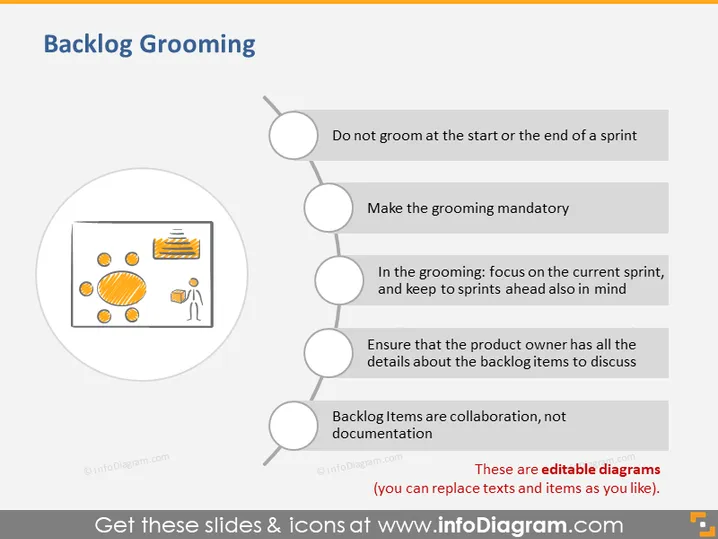
Backlog Grooming is a process in Agile project management and this slide provides guidelines on how to effectively groom the product backlog. The first point is "Do not groom at the start or the end of a sprint," which implies the activity should be continuous. "Make the grooming mandatory" suggests its critical role in project success. "In the grooming: focus on the current sprint, and keep to sprints ahead also in mind" indicates the need for short and long-term planning. Ensuring the product owner is well-informed is summarized in "Ensure that the product owner has all the details about the backlog items to discuss." Finally, "Backlog items are collaboration, not documentation" underscores the importance of teamwork over mere paperwork in backlog management.
The slide design is clean and modern with a neutral color palette that highlights the text and graphic elements. The use of icons and circles creates a structured flow that is easy to follow.



