
Reviews
Your graphics add a nice touch to my presentations and I recently used them for one of my all-hands meetings. Your toolbox adds professionalism to my slides. Instead of using standard clipart.
I needed a fresh look at some of my slides. I've tried to find a way to create a paintbrush effect, to underline, accentuate, add some color and the handwritten markers were just the things. Very easy to use, easy to size, change the color. It was an affordable, perfect solution and I'm happy to recommend it.
The crisp, clean look of the graphics, and the fact that it allowed me to easily edit and change the colors to match the template was my main reason for purchasing them.
Description
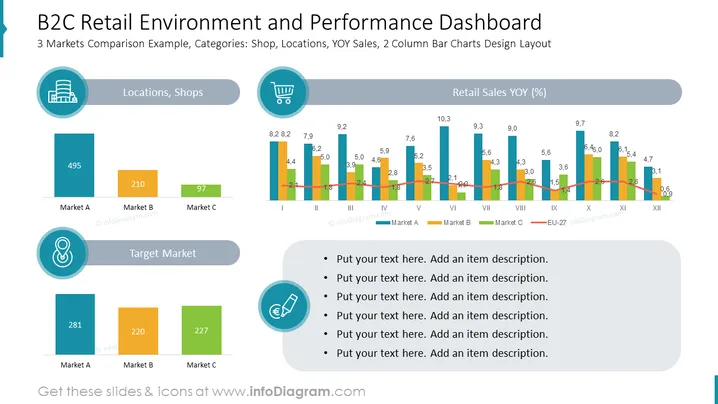
B2C Retail Environment and Performance Dashboard
Slide Content
The slide titled "B2C Retail Environment and Performance Dashboard" compares 3 markets based on categories like shop locations and year-over-year (YOY) sales, using a two-column bar chart design layout. The first section shows numerical values indicating market sizes or locations for Markets A, B, and C. "Target Market" is highlighted, presenting additional market data. There are placeholders for text, presumably to add descriptions or insights about the data presented in the graphics.
Graphical Look
- Two large, dominant column bar charts take center stage, displaying values across different months for Markets A, B, and C, alongside an EU-27 average line.
- Icons representing location and target market are used to visually differentiate these sections.
- The color palette consists of muted blues, greens, oranges, and greys, offering clear distinction between data points without being overly vibrant.
- A rounded rectangle with a gradient serves as a header for the slide title, with similar styling used for subheaders above the bar charts and descriptive text sections.
- Four bullet points are displayed, each with a circular icon followed by a grey text box, intended for contextual descriptions.
The slide has a professional and clean appearance, with data visualization taking priority. The use of color and icons aids quick comprehension of the information presented.
Use Cases
- Presenting retail performance metrics during business reviews or stakeholder meetings.
- Visualizing sales trends across different markets for strategic planning sessions.
- Providing an at-a-glance market comparison in investor or board presentations.
- Using in marketing meetings to discuss the effectiveness of retail location strategies.
How to Edit
How to edit text & colors

How to expand / shorten diagram

How to Replace Icons in infoDiagram PPT


