
Reviews
Sus gráficos añaden un toque agradable a mis presentaciones y recientemente los usé para una de mis reuniones generales. Su conjunto de herramientas añade profesionalismo a mis diapositivas. En lugar de usar imágenes prediseñadas estándar.
Necesitaba un aspecto fresco para algunas de mis diapositivas. Había intentado encontrar una forma de crear un efecto de pincel, de subrayar, acentuar, añadir algo de color y los marcadores escritos a mano fueron justo lo que necesitaba. Muy fácil de usar, fácil de ajustar el tamaño, cambiar el color. Fue una solución asequible y perfecta, y estoy feliz de recomendarla.
El aspecto nítido y limpio de los gráficos, y el hecho de que me permitiera editar y cambiar fácilmente los colores para que coincidieran con la plantilla fue mi principal razón para comprarlos.
Description
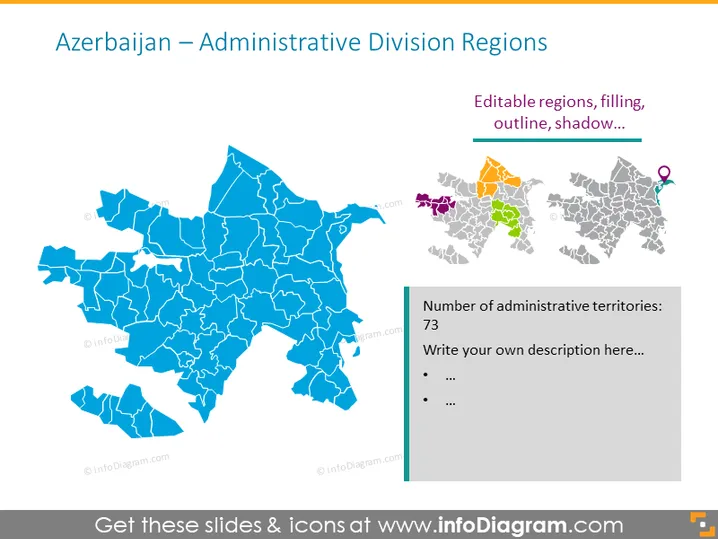
Azerbaijan – Administrative Division Regions
Slide Content
The slide presents a map-oriented approach to Azerbaijan’s administrative divisions. It showcases the country divided into regions with an emphasis on editable features such as region filling, outline, and shadow. To the right, a smaller set of maps highlights specific regions, differentiated by color and marked with a location pin icon. Below is a text box declaring the number of administrative territories (73) and prompts for additional descriptions or points.
Graphical Look
- A large blue shaded map of Azerbaijan, with distinct outlines for the internal administrative regions.
- Three smaller maps to the right, each highlighting different regions in colors—purple, orange, and green—and featuring a location pin icon in one of them.
- A sidebar with a blue background lists the number of administrative territories as 73 and offers bullet points for further description.
- The title of the slide is in large, bold text at the top, and a subtitle with a smaller font size lies beneath it, detailing the customizable features of the map.
The slide is professional and visually oriented, leveraging a harmonious color palette centered around shades of blue. The enlarged main map focuses attention, while the colored regions and icons add informational variety.
Use Cases
- Presenting regional administrative information to stakeholders or in government briefings.
- Educating on geographical divisions and regional characteristics in academic settings.
- Detailing location-specific strategies or developments in business meetings.
- Providing visual support in discussions related to regional planning or resource allocation.
How to Edit
How to edit text & colors

How to expand / shorten diagram

How to Replace Icons in infoDiagram PPT


