
Reviews
The icons are fantastic, easy to use, and will add value to any project or presentation. Keep up the great work.
I love how simple infoDiagram's solutions are and the personal interest they took in my work. Recommended 1000%!
The crisp, clean look of the graphics, and the fact that it allowed me to easily edit and change the colors to match the template was my main reason for purchasing them.
Description
Atom Infographics Template with 3 elements
Slide Content
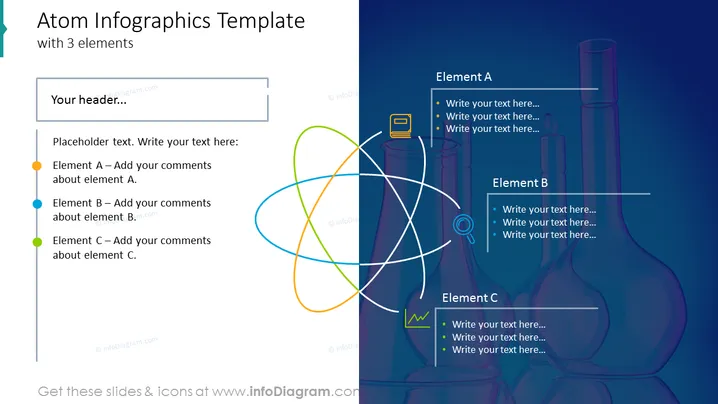
This PowerPoint slide titled 'Atom Infographics Template with 3 elements' is designed for presenting interconnected topics. It suggests a central idea or system with three significant components: Element A, Element B, and Element C, each for adding specific comments. This can represent a concept where three distinct aspects contribute to the overarching subject or interact with each other within a framework, system, or process.
Graphical Look
- The slide background is a gradient of blue hues, providing a sense of depth and professionalism.
- A prominent graphical feature on the right side is a stylized representation of an atom with three overlapping orbits in different colors: green, orange, and blue.
- On the left, there is colored text outlining placeholders for "Your header..." and descriptions for each of the three elements corresponding to the atom's orbits.
- Each element section on the left has a colored dot before the text that matches the colors of the atom's orbits.
- The right side of the slide contains text boxes titled Element A, Element B, and Element C, each with a list where specific details can be entered. These boxes are accented with a color that corresponds with the orbit color of the central atom visual.
- Above the colored orbits, there's a subtle silhouette of laboratory glassware, tying the atom diagram's theme to scientific research.
The slide is visually balanced, with text elements on the left and an attention-grabbing, colorful, atomic diagram on the right. The graphical elements underpin the template's conceptual message of interconnected components within a single system.
Use Cases
- Presenting correlations between components in a scientific research or experimentation scenario, highlighting how separate elements influence each other.
- Used in a business presentation to explain a company's core services or products and how they interrelate or support the core value proposition.
- To visualize a project management framework where three key areas or phases of the project need to be described in relation to one another.
- In educational settings for explaining concepts that have three interconnected aspects such as the triple bottom line in sustainability: social, environmental, and economic.
How to Edit
How to edit text & colors

How to expand / shorten diagram

How to Replace Icons in infoDiagram PPT


