
Reviews
Your graphics add a nice touch to my presentations and I recently used them for one of my all-hands meetings. Your toolbox adds professionalism to my slides. Instead of using standard clipart.
I needed a fresh look at some of my slides. I've tried to find a way to create a paintbrush effect, to underline, accentuate, add some color and the handwritten markers were just the things. Very easy to use, easy to size, change the color. It was an affordable, perfect solution and I'm happy to recommend it.
The crisp, clean look of the graphics, and the fact that it allowed me to easily edit and change the colors to match the template was my main reason for purchasing them.
Description
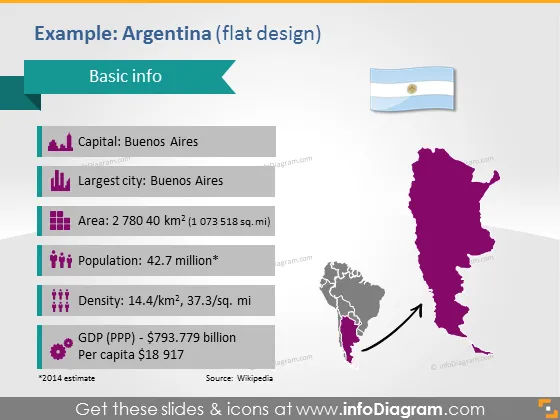
Example: Argentina (flat design)
Slide Content
The slide is titled "Basic info" and it presents essential data about Argentina utilizing a minimalist flat design approach. Key information includes the capital (Buenos Aires), largest city (also Buenos Aires), area (2.780.400 square kilometers), population (approximately 42.7 million), density (14.4/km² which roughly translates to 37.3/sq. mi), and the GDP (PPP) being $793.779 billion with a per capita income of $18,917. This data provides a succinct overview of Argentina's vital statistics, which is helpful for quick reference or introduction.
Graphical Look
- The slide has a purple and grey color scheme.
- Title "Basic info" is in the upper left corner, in purple text.
- Below the title, there is a blue right-arrow-shaped bullet point, followed by the text "Capital: Buenos Aires."
- The same bullet point style is used for "Largest city: Buenos Aires," "Area: 2 780 400 km²," "Population: 42.7 million," "Density: 14.4/km², 37.3/sq. mi," and "GDP (PPP) - $793,779 billion Per capita $18 917."
- Footnotes and source information are provided in a smaller font at the bottom.
- On the right side, there is a stylized purple map of Argentina with a shadow effect.
- Below the map, there is a smaller grey map of South America with a white arrow pointing towards Argentina.
- An image of the Argentine flag is placed in the upper right corner above the map of Argentina.
Overall, the slide has a clean and modern aesthetic with a clear focus on presenting information in an easily digestible format. The use of icons and maps adds a visual element that complements the textual information.
Use Cases
- This slide could be used in an educational presentation to provide a geographic and economic overview of Argentina.
- In a business context, it could serve as an introductory slide for discussing market opportunities or business ventures in Argentina.
- The slide may be part of a broader presentation on South American countries, highlighting key stats and facts for each nation.
- It could also be used by travel companies or tourism boards to give potential tourists or investors quick facts about the country.
How to Edit
How to edit text & colors

How to expand / shorten diagram

How to Replace Icons in infoDiagram PPT


