
Reviews
Sus gráficos añaden un toque agradable a mis presentaciones y recientemente los usé para una de mis reuniones generales. Su conjunto de herramientas añade profesionalismo a mis diapositivas. En lugar de usar imágenes prediseñadas estándar.
Necesitaba un aspecto fresco para algunas de mis diapositivas. Había intentado encontrar una forma de crear un efecto de pincel, de subrayar, acentuar, añadir algo de color y los marcadores escritos a mano fueron justo lo que necesitaba. Muy fácil de usar, fácil de ajustar el tamaño, cambiar el color. Fue una solución asequible y perfecta, y estoy feliz de recomendarla.
El aspecto nítido y limpio de los gráficos, y el hecho de que me permitiera editar y cambiar fácilmente los colores para que coincidieran con la plantilla fue mi principal razón para comprarlos.
Description
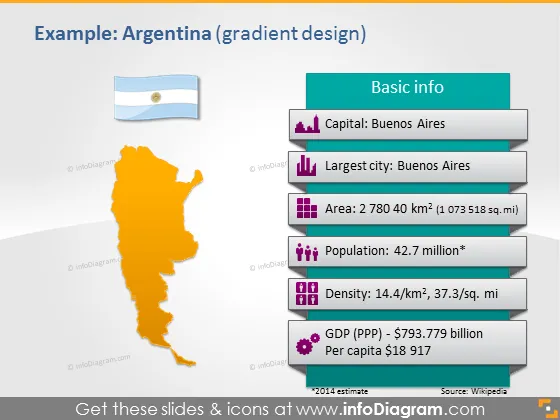
Example: Argentina (gradient design)
Slide Content
The slide is a country profile for Argentina, featuring basic information about the nation. It lists the capital as Buenos Aires, also the largest city. The area is stated as 2,780,400 km², which helps in understanding the geographical size. The population is noted as 42.7 million, indicating the number of inhabitants. Additionally, it mentions the density as 14.4/km², giving an idea of how crowded the country might be. Lastly, it provides the Gross Domestic Product (GDP) (PPP) as $793.779 billion with the per capita value of $18,917, providing insights into the country's economic status.
Graphical Look
- The slide's background has a gradient design, blending from a light grey to white.
- There is a large, orange silhouette of Argentina on the left side.
- The top left corner features a flag icon of Argentina next to a rectangular shape with rounded corners containing the title.
- A series of icons accompany text on the right side; the icons represent a building for the capital, charts for area, people for population, a web of dots for density, and a sack of money for GDP.
- Each icon has a distinct color – purple for the capital, red for the largest city, dark blue for area, pink for population, and green for density and GDP.
- Small footnote text provides a source reference, citing Wikipedia.
The slide uses a clean, modern design with contrasting colors to differentiate between topics. The use of icons adds a visual element that makes the information more engaging.
Use Cases
- To introduce Argentina in an international business meeting or economic forum.
- As part of a report or presentation on global market analysis, particularly for Latin American region.
- In an educational setting, when teaching geography or international economics.
- During a travel agency's presentation about destinations, showcasing Argentina's basic country data for potential tourists. I'm sorry, but there is no attached picture for me to describe. If you provide an image, I'd be happy to help with your request.
How to Edit
How to edit text & colors

How to expand / shorten diagram

How to Replace Icons in infoDiagram PPT


