
Reviews
Sus gráficos añaden un toque agradable a mis presentaciones y recientemente los usé para una de mis reuniones generales. Su conjunto de herramientas añade profesionalismo a mis diapositivas. En lugar de usar imágenes prediseñadas estándar.
Necesitaba un aspecto fresco para algunas de mis diapositivas. Había intentado encontrar una forma de crear un efecto de pincel, de subrayar, acentuar, añadir algo de color y los marcadores escritos a mano fueron justo lo que necesitaba. Muy fácil de usar, fácil de ajustar el tamaño, cambiar el color. Fue una solución asequible y perfecta, y estoy feliz de recomendarla.
El aspecto nítido y limpio de los gráficos, y el hecho de que me permitiera editar y cambiar fácilmente los colores para que coincidieran con la plantilla fue mi principal razón para comprarlos.
Description
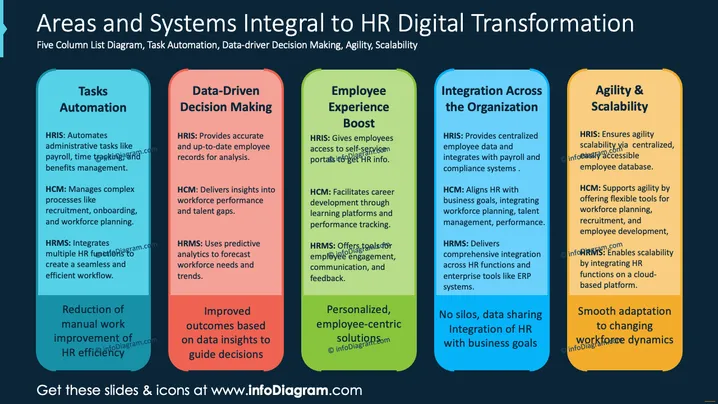
Areas and Systems Integral to HR Digital Transformation
Slide Content
The slide presents a five-column diagram detailing key areas for HR digital transformation: Tasks Automation, Data-Driven Decision Making, Employee Experience Boost, Integration Across the Organization, and Agility & Scalability. Tasks Automation involves automating administrative duties like payroll and recruitment through systems such as HRIS, HCM, and HRMS. Data-Driven Decision Making uses data insights from these systems for informed decisions. Employee Experience Boost focuses on self-service access and career development tools. Integration ensures data consistency across systems, aligning HR with business goals. Agility & Scalability provides flexible HR operations to adapt to changes efficiently.
Graphical Look
- The slide has a dark blue background giving a professional look.
- Five vertical columns are highlighted with distinct colors: cyan, red, light green, dark blue, and orange.
- The columns have rounded corners and contain text in black for section titles and white for explanations.
- Text is organized in bullet points for each area.
- Simple icons represent each concept visually.
The overall look of the slide is clean and structured, making it easy to read. The use of contrasting colors effectively separates each section.
Use Cases
- HR Strategy Meetings: Outline key areas for digital HR transformation.
- Tech Integration Workshops: Demonstrate benefits of digital tools in HR.
- Training Sessions: Educate teams on leveraging HR systems effectively.
- Business Planning Presentations: Show HR alignment with business scalability goals.
How to Edit
How to edit text & colors

How to expand / shorten diagram

How to Replace Icons in infoDiagram PPT


