
Reviews
Sus gráficos añaden un toque agradable a mis presentaciones y recientemente los usé para una de mis reuniones generales. Su conjunto de herramientas añade profesionalismo a mis diapositivas. En lugar de usar imágenes prediseñadas estándar.
Necesitaba un aspecto fresco para algunas de mis diapositivas. Había intentado encontrar una forma de crear un efecto de pincel, de subrayar, acentuar, añadir algo de color y los marcadores escritos a mano fueron justo lo que necesitaba. Muy fácil de usar, fácil de ajustar el tamaño, cambiar el color. Fue una solución asequible y perfecta, y estoy feliz de recomendarla.
El aspecto nítido y limpio de los gráficos, y el hecho de que me permitiera editar y cambiar fácilmente los colores para que coincidieran con la plantilla fue mi principal razón para comprarlos.
Description
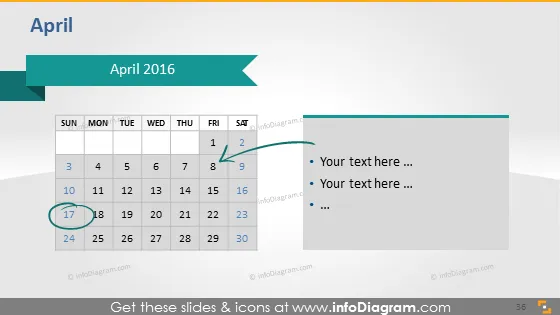
April 2016
Slide Content
The slide presents a calendar for the month of April 2016 with a focus on the week of the 17th, where the date is highlighted in a darker shade. Additional space is provided on the right for text, with bullet points indicating where the presenter can add specific details or notes relevant to the dates on the calendar.
Graphical Look
- The slide background is a gradient of light to darker teal shades.
- The title "April 2016" is prominently displayed in white on a darker teal ribbon banner that has a folded effect on the right edge.
- A standard monthly calendar layout with seven columns representing days of the week is shown.
- Each day of the month is enclosed in a white rounded rectangle, with the current week highlighted by a darker shade.
- The 17th of the month is highlighted in an even darker shade with a circle around the date.
- On the right side, there's a white, transparent overlay rectangle meant for entering text, with three bullet points already placed.
- The font color used for additional text is black, while weekdays and dates on the calendar are displayed in dark grey.
The slide is clean and has a professional look, with a color scheme that provides good contrast between elements. The highlighting of the specific date and the provision for additional text makes it functional and easy to understand.
Use Cases
- To display key dates or deadlines for projects during business meetings or planning sessions.
- As part of a monthly overview in a company-wide presentation to highlight important events or milestones.
- In a marketing presentation to pinpoint campaign launch dates or promotion periods.
- For personal time management during workshops or seminars, showing significant dates for assignment due dates or exams.
How to Edit
How to edit text & colors

How to expand / shorten diagram

How to Replace Icons in infoDiagram PPT


