
Reviews
Sus gráficos añaden un toque agradable a mis presentaciones y recientemente los usé para una de mis reuniones generales. Su conjunto de herramientas añade profesionalismo a mis diapositivas. En lugar de usar imágenes prediseñadas estándar.
Necesitaba un aspecto fresco para algunas de mis diapositivas. Había intentado encontrar una forma de crear un efecto de pincel, de subrayar, acentuar, añadir algo de color y los marcadores escritos a mano fueron justo lo que necesitaba. Muy fácil de usar, fácil de ajustar el tamaño, cambiar el color. Fue una solución asequible y perfecta, y estoy feliz de recomendarla.
El aspecto nítido y limpio de los gráficos, y el hecho de que me permitiera editar y cambiar fácilmente los colores para que coincidieran con la plantilla fue mi principal razón para comprarlos.
Description
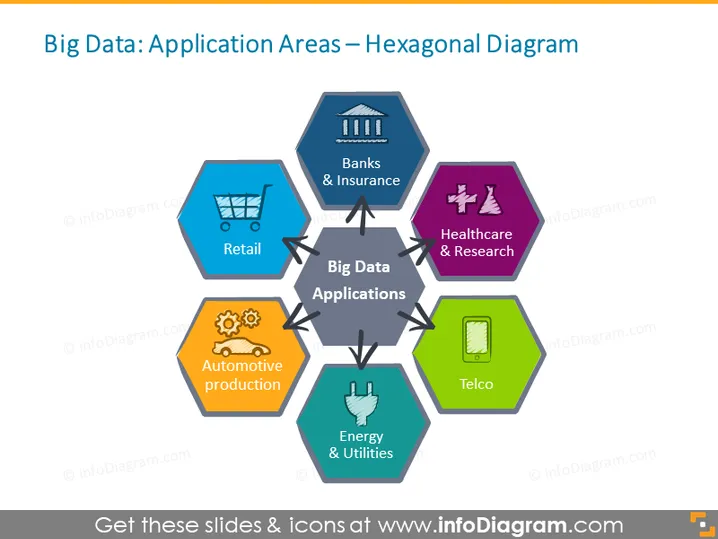
Big Data: Application Areas – Hexagonal Diagram
Slide Content
The slide presents the diverse sectors where Big Data can be applied, visually represented through a central hexagon labeled "Big Data Applications," surrounded by six other hexagons. Each surrounding hexagon represents a different industry: "Banks & Insurance," implying financial services; "Healthcare & Research," relating to medical and scientific data usage; "Telco," denoting telecommunications; "Energy & Utilities," indicating sectors like electricity and water; "Automotive production," which covers vehicle manufacturing data; and "Retail," referring to consumer sales analytics.
Graphical Look
- Central large grey hexagon with the title "Big Data Applications."
- Six surrounding hexagons, each with a unique color and an icon representing different industries.
- Line connections between the central hexagon and each of the surrounding industry hexagons.
- Industry hexagons contain icons: a shopping cart for Retail, bank columns for Banks & Insurance, a cogwheel for Automotive production, a microscope for Healthcare & Research, a plug for Energy & Utilities, and a mobile device for Telco.
- Each industry hexagon has a small title label, white text on a semi-transparent black strip.
The slide has a clean, organized appearance with a harmonious color palette and easy-to-understand visual connectors that create a hub-and-spoke model. The icons are intuitive, aiding quick recognition of the corresponding sectors.
Use Cases
- Presenting industry-specific use cases of Big Data in a corporate presentation.
- Explaining the impact of Big Data in various market segments during an educational seminar.
- Showcasing business opportunities related to Big Data analytics in an investor relations meeting.
- Introducing a Big Data service or product and its relevancy across different sectors to potential clients.
How to Edit
How to edit text & colors

How to expand / shorten diagram

How to Replace Icons in infoDiagram PPT


