

Your graphics add a nice touch to my presentations and I recently used them for one of my all-hands meetings. Your toolbox adds professionalism to my slides. Instead of using standard clipart.
Claude Jones, Director of Engineer, @Walmartlabs, USA

Your graphics add a nice touch to my presentations and I recently used them for one of my all-hands meetings. Your toolbox adds professionalism to my slides. Instead of using standard clipart.
Claude Jones, Director of Engineer, @Walmartlabs, USA
I needed a fresh look at some of my slides. I've tried to find a way to create a paintbrush effect, to underline, accentuate, add some color and the handwritten markers were just the things. Very easy to use, easy to size, change the color. It was an affordable, perfect solution and I'm happy to recommend it.
Anonymous, US
The crisp, clean look of the graphics, and the fact that it allowed me to easily edit and change the colors to match the template was my main reason for purchasing them.
Brandie Jenkins, E-learning Developer, USA
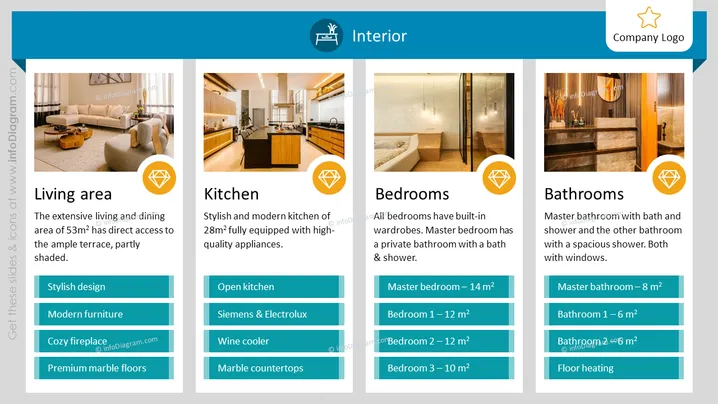
The slide is titled "Interior" and highlights features of a home's living area, kitchen, bedrooms, and bathrooms. The living area is described as extensive with 53m² and access to a terrace, highlighting a stylish design, modern furniture, cozy fireplace, and premium marble floors. The kitchen is stylish and modern, 28m², with high-quality Siemens & Electrolux appliances, an open kitchen design, wine cooler, and marble countertops. Bedrooms feature built-in wardrobes; the master has 14m² and its own bath and shower. Bathrooms are detailed with sizes, a master bathroom at 8m² with bath and shower, another with a spacious shower, and floor heating is mentioned.
The slide is well-structured and aesthetically pleasing, using images and color-coded sections to convey information effectively. The design is clean and professional, with a visually balanced distribution of text and graphic elements.



