
Reviews
Deine Folien sind meine 'geheime Zutat', wenn es darum geht, meine Ideen Kunden zu visualisieren. Ich spare so viel Zeit.
Ihre Folien führen oft zu guten Kommentaren und Ideen meines Teams, die die endgültigen Folien verbessern.
Description
Exterior
Slide Content
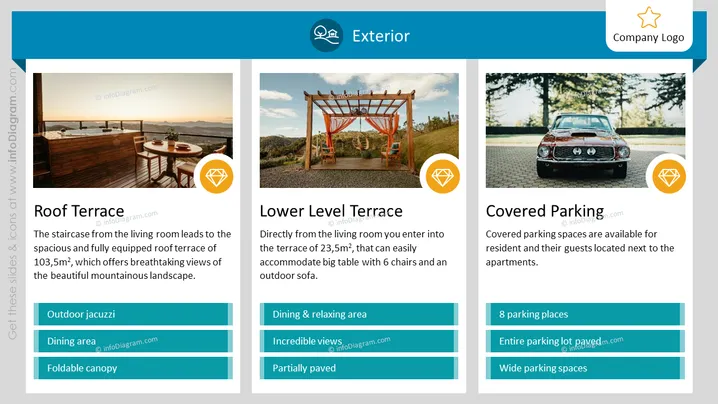
The PowerPoint slide presents features of an "Exterior" space, covering three aspects: the Roof Terrace, Lower Level Terrace, and Covered Parking.
- Roof Terrace: Boasts a spacious and fully equipped area of 103.5m² with an outdoor jacuzzi, dining area, and foldable canopy, offering views of a mountainous landscape.
- Lower Level Terrace: At 23.5m², includes a dining and relaxing area with incredible views and is partially paved.
- Covered Parking: Provides 8 parking spaces, a fully paved lot, and wide spaces for the convenience of residents and their guests.
Graphical Look
- The slide has a clean, modern design with a dominant blue color theme.
- There are three columns, each with a large photo representing the respective feature.
- At the top of each column is a circle-shaped icon with a relevant symbol (a home, outdoor chair, and car).
- Each section has a bold title for the Roof Terrace, Lower Level Terrace, and Covered Parking.
- Below each title is a short description of the feature.
- Each section includes teal-colored text boxes with white text detailing additional attributes.
- The upper left corner contains a smaller version of the slide's title "Exterior" in white text.
- There is a company logo placeholder in the upper right corner.
The slide is visually balanced, with text and images that complement each other to give a complete overview. The consistent design across the three sections helps maintain a professional and unified look.
Use Cases
- To showcase real estate or hotel amenities in sales presentations.
- In architectural or landscape design proposals to highlight outdoor features.
- For property management companies to present facilities to potential tenants or investors.
- When detailing the exterior features of a residential or commercial development in a marketing brochure.
How to Edit
How to edit text & colors

How to expand / shorten diagram

How to Replace Icons in infoDiagram PPT


