
Reviews
Sus gráficos añaden un toque agradable a mis presentaciones y recientemente los usé para una de mis reuniones generales. Su conjunto de herramientas añade profesionalismo a mis diapositivas. En lugar de usar imágenes prediseñadas estándar.
Necesitaba un aspecto fresco para algunas de mis diapositivas. Había intentado encontrar una forma de crear un efecto de pincel, de subrayar, acentuar, añadir algo de color y los marcadores escritos a mano fueron justo lo que necesitaba. Muy fácil de usar, fácil de ajustar el tamaño, cambiar el color. Fue una solución asequible y perfecta, y estoy feliz de recomendarla.
El aspecto nítido y limpio de los gráficos, y el hecho de que me permitiera editar y cambiar fácilmente los colores para que coincidieran con la plantilla fue mi principal razón para comprarlos.
Description
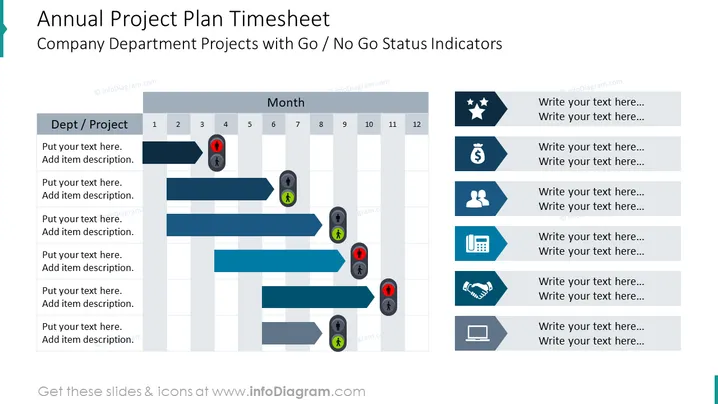
Annual Project Plan Timesheet Company Department Projects with Go / No Go Status Indicators
Slide Content:
The slide is an annual project plan timesheet, which uses Go / No Go status indicators for tracking the progress of company department projects across the year. Each project or department is listed on the left, with the months displayed across the top. Go / No Go indicators, such as a green checkmark for 'Go' and a red alert sign for 'No Go', are placed in the timeline to reflect the status at different points in the year.
Graphical Look:
- A column on the left for department or project names.
- Twelve columns across the top representing each month of the year.
- Horizontal bars spanning across the months indicating the duration of projects.
- Go / No Go status icons placed at various points on the project timelines.
- The icons include green checkmarks and red warning signs.
- A white background behind the project names and Manage yearly project timelines with this slide, featuring intuitive Go / No Go status indicators for easy tracking. A darker grey background behind the months.
The slide has a clean and organized layout, with a straightforward color scheme that highlights the status of projects in a visually intuitive manner.
Use Cases:
This slide would be ideal for annual planning meetings, quarterly reviews, or project management updates, where it's essential to visualize the progress and status of multiple projects over the course of a year.
How to Edit
How to edit text & colors

How to expand / shorten diagram

How to Replace Icons in infoDiagram PPT


