
Reviews
Vos graphiques ajoutent une belle touche à mes présentations et je les ai récemment utilisés pour l'une de mes réunions générales. Votre boîte à outils ajoute du professionnalisme à mes diapositives. Au lieu d'utiliser des cliparts standards.
J'avais besoin d'un nouveau regard sur certaines de mes diapositives. J'ai essayé de trouver un moyen de créer un effet de pinceau, de souligner, d'accentuer, d'ajouter de la couleur et les marqueurs manuscrits étaient exactement ce qu'il fallait. Très facile à utiliser, facile à ajuster la taille, à changer la couleur. C'était une solution abordable et parfaite et je suis heureux de la recommander.
L'aspect net et épuré des graphiques, et le fait qu'il m'ait permis d'éditer et de changer facilement les couleurs pour les adapter au modèle, ont été les principales raisons de mon achat.
Description
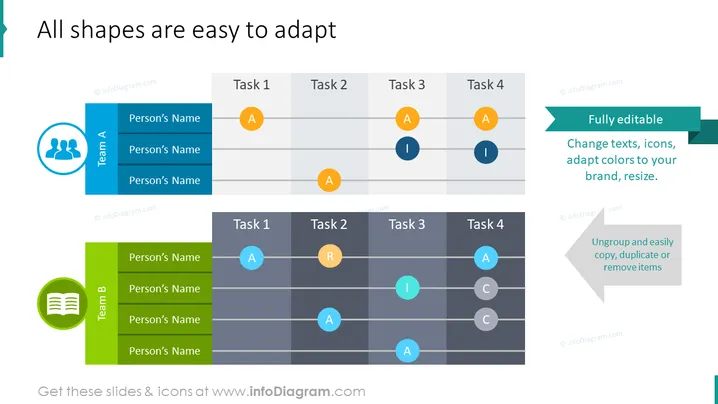
All shapes are easy to adapt
Slide Content
The slide showcases customizable elements for team tasks or project management purposes. It presents two main components: Team A and Team B, each associated with a list of unnamed team members and a grid showing the distribution of tasks labeled as 'Task 1' through 'Task 4'. Accompanying these tasks are colored circles with letters 'A', 'I', 'R', and 'C', likely symbolizing different statuses or roles such as 'Assigned', 'In review', 'Resolved', etc. It emphasizes the ease of editing these objects to fit different branding or reporting needs.
Graphical Look
- The slide background is white.
- Two main content columns are differentiated by blue and green vertical banners labeled 'Team A' and 'Team B'.
- Each banner has a corresponding icon: a group of people for Team A and a report/book for Team B.
- A team list under each banner with the placeholder 'Person’s Name' is visible.
- Task grids with horizontal rows labeled 'Task 1' to 'Task 4' have letters inside colored circles (orange for 'A', teal for 'I', and coral for 'R' and 'C').
- Two callout boxes with drop shadows are located on the right side, both with the message "Fully editable" and additional supporting text.
- The top callout is teal with white text, and the bottom is a light grey with grey text.
The slide has a clean and professional look, leveraging a consistent color scheme and clear fonts to present information. The visual elements are designed for interactivity and adaptability, with a focus on task management.
Use Cases
- Presenting team responsibilities and task assignments in project management meetings.
- Customizing task status updates during scrum or agile sprints.
- Using as a template for departmental updates or cross-functional team collaborations.
- Adapting the slide for various workflow presentations where individual tasks and team member roles need to be clearly outlined and tracked.
How to Edit
How to edit text & colors

How to expand / shorten diagram

How to Replace Icons in infoDiagram PPT


