
Reviews
Sus gráficos añaden un toque agradable a mis presentaciones y recientemente los usé para una de mis reuniones generales. Su conjunto de herramientas añade profesionalismo a mis diapositivas. En lugar de usar imágenes prediseñadas estándar.
Necesitaba un aspecto fresco para algunas de mis diapositivas. Había intentado encontrar una forma de crear un efecto de pincel, de subrayar, acentuar, añadir algo de color y los marcadores escritos a mano fueron justo lo que necesitaba. Muy fácil de usar, fácil de ajustar el tamaño, cambiar el color. Fue una solución asequible y perfecta, y estoy feliz de recomendarla.
El aspecto nítido y limpio de los gráficos, y el hecho de que me permitiera editar y cambiar fácilmente los colores para que coincidieran con la plantilla fue mi principal razón para comprarlos.
Description
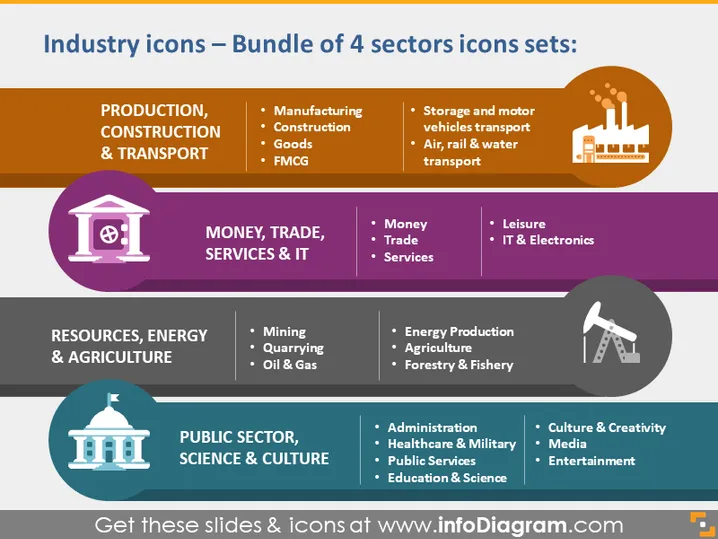
Industry icons – Bundle of 4 sectors icons sets:
Slide Content
The slide presents a collection of four different sector icon sets. PRODUCTION, CONSTRUCTION & TRANSPORT includes items like Manufacturing, which could relate to the production of goods, and Construction, which refers to building infrastructure. MONEY, TRADE, SERVICES & IT encompasses sectors like Money, Trade, and IT & Electronics. RESOURCES, ENERGY & AGRICULTURE features Mining and Energy Production, which includes sourcing and generating power. Lastly, PUBLIC SECTOR, SCIENCE & CULTURE covers Administration and Education & Science, relating to governmental and educational services.
Graphical Look
- The slide's background is divided into colored horizontal sections, each with a different color representing a different industry sector.
- At the top of the slide, there's the title in white font against a dark background.
- Each section contains an icon within a circular shape, which symbolizes the respective sector.
- The icons are colored differently—purple, gray, teal, and lighter blue—standing out from the background.
- To the right of the icons are bulleted lists with white text, each bullet item corresponding to a sub-category within the sector.
- Lines divide the sectors horizontally, and finer lines separate the sub-category text.
The overall look of the slide is clean and modern, with a color-coded system to differentiate between industry sectors. The visual elements are simple and iconographic, designed for quick interpretation.
Use Cases
- Presenting an overview of different business sectors in a corporate setting.
- Showcasing the range of industries a company operates in during a stakeholder meeting.
- Providing a visual breakdown of market segments for strategic planning sessions.
- Using as an educational tool to illustrate the variety of economic sectors and their subcategories.
How to Edit
How to edit text & colors

How to expand / shorten diagram

How to Replace Icons in infoDiagram PPT


