
Reviews
Your graphics add a nice touch to my presentations and I recently used them for one of my all-hands meetings. Your toolbox adds professionalism to my slides. Instead of using standard clipart.
I needed a fresh look at some of my slides. I've tried to find a way to create a paintbrush effect, to underline, accentuate, add some color and the handwritten markers were just the things. Very easy to use, easy to size, change the color. It was an affordable, perfect solution and I'm happy to recommend it.
The crisp, clean look of the graphics, and the fact that it allowed me to easily edit and change the colors to match the template was my main reason for purchasing them.
Description
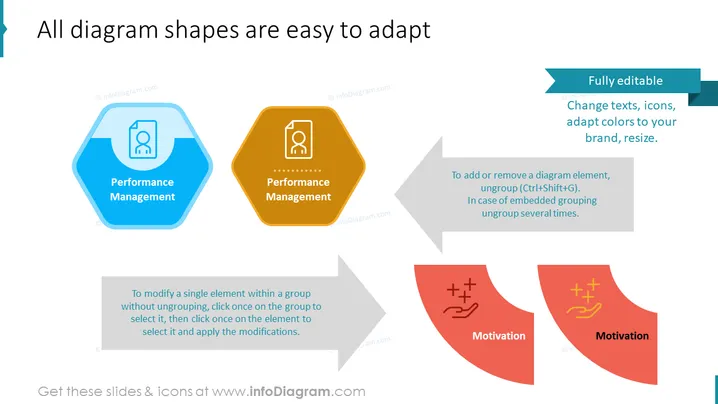
All diagram shapes are easy to adapt
Slide Content
The slide appears to be showcasing the adaptability of diagram shapes for presentation purposes. The text indicates that the diagram shapes are "Fully editable," allowing for changes in text, icons, color adaptation to match a brand's theme, and resizing. Instructions are provided on how to modify a single element within a group without ungrouping, and how to add or remove elements, specifying keyboard shortcuts for ungrouping. The concepts of "Performance Management" and "Motivation" are presented as examples, with each being embedded in hexagon and arrow shapes, suggestive of diagram components that could be customized for various presentation needs.
Graphical Look
- Three pairs of hexagon and arrow shapes, differentiated by colors blue, orange, and red.
- Each shape contains an icon and a label; the blue and orange shapes are labeled "Performance Management," and the red shapes are labeled "Motivation."
- A blue banner across the top of the slide with the title in white text.
- Two text boxes containing explanatory notes on how to edit the diagram shapes.
- A large grey arrow graphic is used to connect the flow between the shapes and the instructional text.
The slide has a clean, modern design with simple geometric shapes and a minimalistic color palette, emphasizing functionality.
Use Cases
- Introducing editable templates for business presentation designs to allow for the customization of content.
- Demonstrating the flexibility of a presentation tool or software during a training or tutorial session.
- Showcasing company performance management and motivation strategies in a visually engaging way.
- Explaining the process of editing and customizing diagrams within a presentation to a non-technical audience.
How to Edit
How to edit text & colors

How to expand / shorten diagram

How to Replace Icons in infoDiagram PPT


