
Reviews
Your graphics add a nice touch to my presentations and I recently used them for one of my all-hands meetings. Your toolbox adds professionalism to my slides. Instead of using standard clipart.
I needed a fresh look at some of my slides. I've tried to find a way to create a paintbrush effect, to underline, accentuate, add some color and the handwritten markers were just the things. Very easy to use, easy to size, change the color. It was an affordable, perfect solution and I'm happy to recommend it.
The crisp, clean look of the graphics, and the fact that it allowed me to easily edit and change the colors to match the template was my main reason for purchasing them.
Description
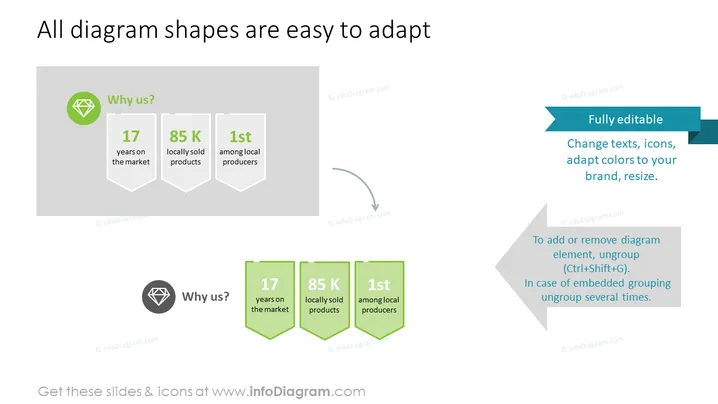
All diagram shapes are easy to adapt
Slide Content
The slide presents the customizability of diagram shapes, emphasizing their adaptability for various presentations. It highlights a set of three key selling points: "17 years on the market," showing longevity, "85 K locally sold products," indicating a broad distribution, and "1st among local producers," pointing to market leadership. These points are represented twice, first with a monochromatic scheme and secondly in a more vibrant green hue to show the before and after states of customization.
Graphical Look
- The slide has a clean, modern design with a lot of white space.
- There is a large header in dark grey text at the top of the slide.
- The left side of the slide shows three shield-like shapes with a diamond icon above them, labeled "Why us?" in muted colors.
- The right side repeats the shield shapes and accompanying text in bright green, with arrows indicating the transition from the default design to the customized one.
- Two text boxes with blue headers provide additional information about the editability of the shapes and how to ungroup elements.
- All graphical elements have a flat design aesthetic.
The overall look is professional and sleek, using contrast to effectively demonstrate the adaptability of slide elements. There is a good balance between text and graphics which facilitates clear communication without overwhelming the audience.
Use Cases
- To showcase a company's unique selling propositions during a business presentation.
- To outline key business metrics in a visually engaging way during an annual shareholders' meeting.
- To demonstrate the adaptability of a product or service to potential clients or partners.
- To provide a visual comparison of data points before and after implementing a strategy or solution in business review meetings.
How to Edit
How to edit text & colors

How to expand / shorten diagram

How to Replace Icons in infoDiagram PPT


