
Reviews
Ihre Grafiken verleihen meinen Präsentationen eine nette Note, und ich habe sie kürzlich für eines meiner All-Hands-Meetings verwendet. Ihre Toolbox verleiht meinen Folien Professionalität, anstatt Standard-Clipart zu verwenden.
Ich brauchte einen neuen Blick auf einige meiner Folien. Ich habe versucht, einen Weg zu finden, einen Pinselschlag-Effekt zu erzielen, um zu unterstreichen, hervorzuheben, Farbe hinzuzufügen, und die handgeschriebenen Markierungen waren genau das Richtige. Sehr einfach zu bedienen, leicht in der Größe zu ändern, die Farbe zu ändern. Es war eine erschwingliche, perfekte Lösung und ich empfehle sie gerne weiter.
Die klare, saubere Optik der Grafiken und die Tatsache, dass ich die Farben leicht bearbeiten und an die Vorlage anpassen konnte, war mein Hauptgrund für den Kauf.
Description
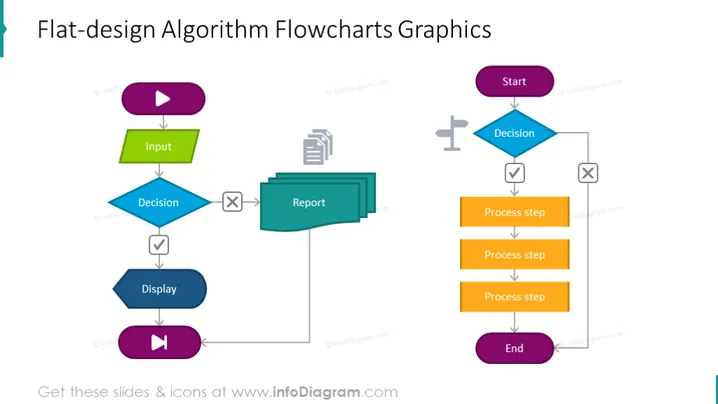
Before writing a program, it is recommended that you first establish a procedure for solving the problem at hand. Writing a program without proper pre-planning can lead to more errors. Algorithms and flowcharts are powerful tools for learning a programming language. An algorithm is a step-by-step process, whereas a flowchart explains the steps of a program in a graphical way. This flowchart algorithm presentation slide can help you clarify all the steps needed for problem-solving. If you are new to programming, it is advised that you first write an algorithm and draw a flowchart before attempting to write a program. In our slide, we have explained the process in the following way: making a decision, then explaining the process steps, which create the algorithm, and if everything is successful, end it. When you plan to start your program, check your input, make a decision and write a report about it, display it, then launch it. This slide is a part of the Flow Chart PPT PowerPoint Presentation Template deck.
##Slide Infographics description:
Flat Design Flowchart Diagram, Press Play Button Icon, Parallelogram Textbox, Rectangular Text Blocks, Arrow Line Vector, Cross Icon, Checkmark Icon, Report Icon, Flat Grey Outline Icons, Road Direction Icon, White Background
How to Edit
How to edit text & colors

How to expand / shorten diagram

How to Replace Icons in infoDiagram PPT


