

Your graphics add a nice touch to my presentations and I recently used them for one of my all-hands meetings. Your toolbox adds professionalism to my slides. Instead of using standard clipart.
Claude Jones, Director of Engineer, @Walmartlabs, USA

Your graphics add a nice touch to my presentations and I recently used them for one of my all-hands meetings. Your toolbox adds professionalism to my slides. Instead of using standard clipart.
Claude Jones, Director of Engineer, @Walmartlabs, USA
I needed a fresh look at some of my slides. I've tried to find a way to create a paintbrush effect, to underline, accentuate, add some color and the handwritten markers were just the things. Very easy to use, easy to size, change the color. It was an affordable, perfect solution and I'm happy to recommend it.
Anonymous, US
The crisp, clean look of the graphics, and the fact that it allowed me to easily edit and change the colors to match the template was my main reason for purchasing them.
Brandie Jenkins, E-learning Developer, USA
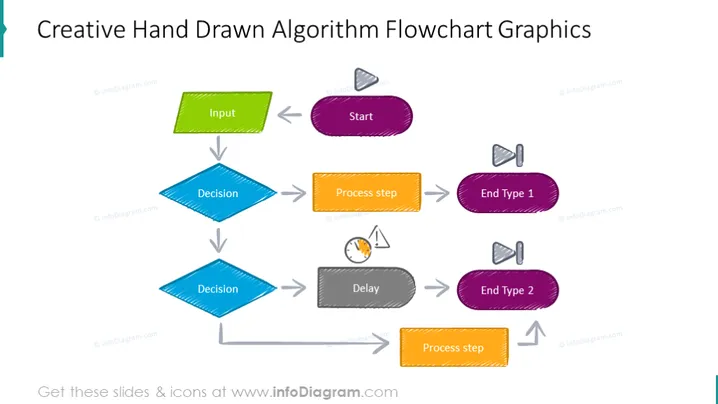
The slide illustrates a simple algorithm flowchart with a hand-drawn aesthetic. It starts with an "Input" in a green rectangle, then flows to a "Start" parallelogram, suggesting the initiation of a process. Two "Decision" diamonds follow, indicating points where a choice must be made, each leading to either a "Process step" or a delay symbolized by a clock, and ultimately to two distinct "End Type" terminations. The "Input" represents the data or information required to begin the process. The "Start" initiates the sequence of actions. Each "Decision" represents a junction where a determination is made to follow one path or another. The "Process step" reflects tasks or operations in the workflow. The clock indicates a waiting or pausing period, and "End Type 1" and "End Type 2" signify different conclusions or outcomes of the process.
The slide has an informal and engaging design, achieved through the use of hand-drawn sketch-like elements and a bright color scheme. This gives the impression of a personal, non-traditional approach to presenting workflow concepts.



