
Reviews
Sus gráficos añaden un toque agradable a mis presentaciones y recientemente los usé para una de mis reuniones generales. Su conjunto de herramientas añade profesionalismo a mis diapositivas. En lugar de usar imágenes prediseñadas estándar.
Necesitaba un aspecto fresco para algunas de mis diapositivas. Había intentado encontrar una forma de crear un efecto de pincel, de subrayar, acentuar, añadir algo de color y los marcadores escritos a mano fueron justo lo que necesitaba. Muy fácil de usar, fácil de ajustar el tamaño, cambiar el color. Fue una solución asequible y perfecta, y estoy feliz de recomendarla.
El aspecto nítido y limpio de los gráficos, y el hecho de que me permitiera editar y cambiar fácilmente los colores para que coincidieran con la plantilla fue mi principal razón para comprarlos.
Description
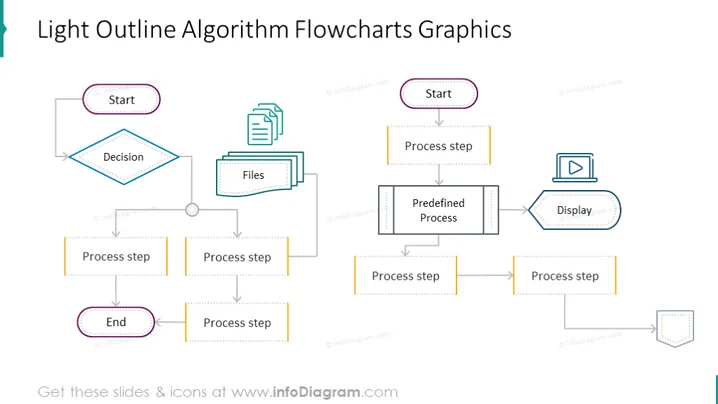
Light Outline Algorithm Flowcharts Graphics
Slide Content:
The slide showcases two separate flowcharts related to algorithm processes. The first flowchart starts with a 'Start' node, leads to a 'Decision' diamond, branches off to a 'Files' rectangle indicating document handling, and includes multiple 'Process step' nodes, concluding with an 'End' node. The second flowchart begins with a 'Start' node, follows with a 'Process step', moves to a 'Predefined Process' rectangle, and continues through additional 'Process step' nodes before reaching an off-page reference, implying the process continues elsewhere. These flowcharts visually describe a sequence of operations or steps in an algorithmic process.
Graphical Look:
- The 'Start' and 'End' nodes are oval with purple dashed borders.
- The 'Decision' node is a blue diamond, while 'Files' and 'Predefined Process' are represented by rectangles with a dashed outline and a document icon.
- 'Process steps' are shown as yellow rectangles with solid borders.
- There is an icon of a display screen indicating a user interface or output step.
- Arrows are used to connect the nodes, indicating the flow of the process.
- The design is minimalistic, with each shape and line cleanly presented against a white or light background.
The slide is clean and professional, with a minimalistic style that focuses on the clarity of the process being described. The use of light outlines and simple icons creates an easy-to-follow visual guide for the flowcharts.
Use Cases:
- For educational purposes to teach students about the basics of algorithm design.
- In a business setting to illustrate the flow of processes within software or systems.
- During a team meeting to plan and discuss workflows for a new project.
- As a template for technical documentation where specific algorithm processes need to be outlined.
How to Edit
How to edit text & colors

How to expand / shorten diagram

How to Replace Icons in infoDiagram PPT


