
Reviews
Ihre Grafiken verleihen meinen Präsentationen eine nette Note, und ich habe sie kürzlich für eines meiner All-Hands-Meetings verwendet. Ihre Toolbox verleiht meinen Folien Professionalität, anstatt Standard-Clipart zu verwenden.
Ich brauchte einen neuen Blick auf einige meiner Folien. Ich habe versucht, einen Weg zu finden, einen Pinselschlag-Effekt zu erzielen, um zu unterstreichen, hervorzuheben, Farbe hinzuzufügen, und die handgeschriebenen Markierungen waren genau das Richtige. Sehr einfach zu bedienen, leicht in der Größe zu ändern, die Farbe zu ändern. Es war eine erschwingliche, perfekte Lösung und ich empfehle sie gerne weiter.
Die klare, saubere Optik der Grafiken und die Tatsache, dass ich die Farben leicht bearbeiten und an die Vorlage anpassen konnte, war mein Hauptgrund für den Kauf.
Description
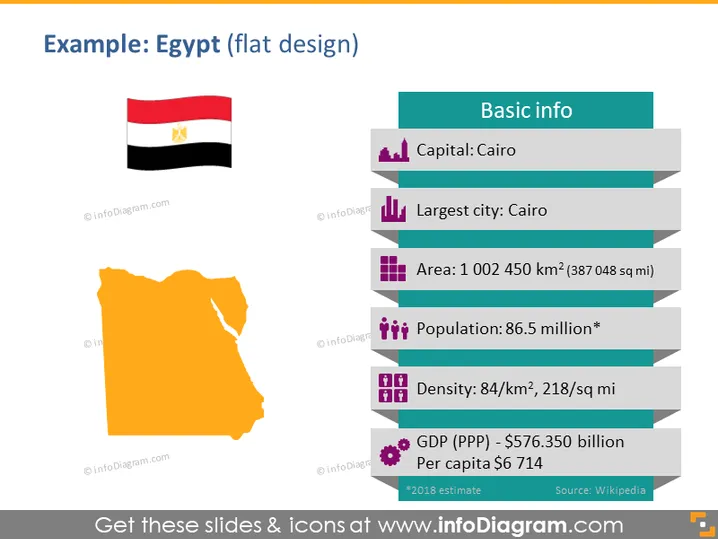
Example: Egypt (flat design)
Slide Content
The PowerPoint slide is titled "Example: Egypt (flat design)" and provides basic information about Egypt in a clear and structured manner. The capital is stated as Cairo, which is also the largest city. The area of Egypt is given as 1,002,450 square kilometers. The population is listed as 86.5 million, suggesting this figure is an estimate with the asterisk. Population density is provided as 84 per square kilometer. Furthermore, the Gross Domestic Product (GDP) based on Purchasing Power Parity (PPP) is $576.350 billion, with a per capita GDP of $6,714, referencing 2018 estimates and citing Wikipedia as the source.
Graphical Look
- The slide background is white.
- A large title in dark text "Example: Egypt (flat design)" is present at the top.
- Below the title, on the left, there is a stylized, flat design map of Egypt in orange.
- Above the map is an image of the Egyptian flag.
- To the right, a column with a teal header reads "Basic info."
- Each piece of information is paired with a corresponding icon and placed beside a horizontally striped bar that extends from the teal header.
- The icons include a building for capital, a cityscape for largest city, stacked bars for area, population figures for population, a group for density, and a dollar symbol for GDP.
- The footer text has a smaller font size and provides a source citation.
The slide has a modern and colorful flat design with easily discernible elements that are well organized. The use of icons next to each data point helps in quickly identifying the type of information presented.
Use Cases
- Utilized in educational presentations to introduce Egypt's geographic and demographic statistics.
- Included in business briefings to discuss investment or market analysis for Egypt.
- Integrated into travel or tourism presentations to showcase Egypt's country profile. I'm sorry, but there seems to be a misunderstanding. There is no picture attached for me to describe or analyze a PowerPoint slide. If you have an image you'd like me to describe, please attach it and I'd be happy to help.
How to Edit
How to edit text & colors

How to expand / shorten diagram

How to Replace Icons in infoDiagram PPT


