

Your graphics add a nice touch to my presentations and I recently used them for one of my all-hands meetings. Your toolbox adds professionalism to my slides. Instead of using standard clipart.
Claude Jones, Director of Engineer, @Walmartlabs, USA

Your graphics add a nice touch to my presentations and I recently used them for one of my all-hands meetings. Your toolbox adds professionalism to my slides. Instead of using standard clipart.
Claude Jones, Director of Engineer, @Walmartlabs, USA
I needed a fresh look at some of my slides. I've tried to find a way to create a paintbrush effect, to underline, accentuate, add some color and the handwritten markers were just the things. Very easy to use, easy to size, change the color. It was an affordable, perfect solution and I'm happy to recommend it.
Anonymous, US
The crisp, clean look of the graphics, and the fact that it allowed me to easily edit and change the colors to match the template was my main reason for purchasing them.
Brandie Jenkins, E-learning Developer, USA
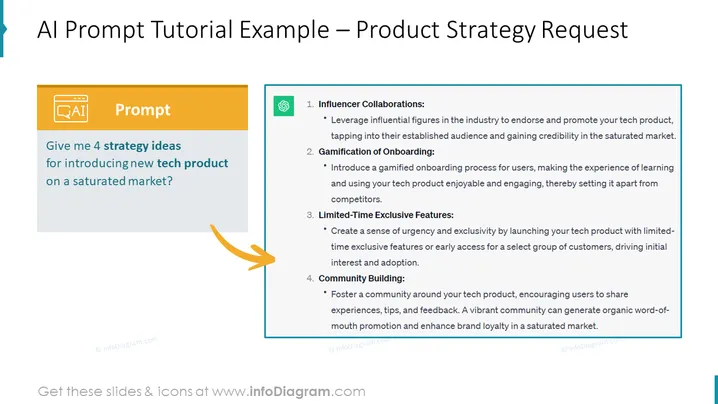
The slide provides a clear prompt requesting four strategic ideas for launching a new tech product in a competitive market. The strategies listed are Influencer Collaborations, Gamification of Onboarding, Limited-Time Exclusive Features, and Community Building. Influencer Collaborations aim to gain credibility and audience through industry endorsements. Gamification of Onboarding focuses on an enjoyable and engaging learning process for users. Limited-Time Exclusive Features create urgency and drive initial interest by offering early access or unique features. Lastly, Community Building encourages brand loyalty and organic promotion by engaging with users and creating a space for shared experiences.
The combination of colors and layout gives the slide an organized and visually appealing look. The use of icons alongside text makes the information easily digestible and engaging.
Ideal for use in marketing strategy meetings to discuss and brainstorm approaches for entering a competitive market with new technology products.
Can be utilized during product launch planning sessions with the aim to align team members on the marketing and engagement #### Use Cases
Ideal for use in marketing strategy meetings to discuss and brainstorm approaches for entering a competitive market with new technology products.
Can be utilized during product launch planning sessions with the aim to align team members on the marketing and engagement strategies.
Helpful for presentations to potential investors or partners outlining a strategic plan for product differentiation in a crowded marketplace.
Suitable for internal training or workshops to educate marketing teams on innovative tactics to generate user interest and loyalty.



