
Reviews
Ihre Grafiken verleihen meinen Präsentationen eine nette Note, und ich habe sie kürzlich für eines meiner All-Hands-Meetings verwendet. Ihre Toolbox verleiht meinen Folien Professionalität, anstatt Standard-Clipart zu verwenden.
Ich brauchte einen neuen Blick auf einige meiner Folien. Ich habe versucht, einen Weg zu finden, einen Pinselschlag-Effekt zu erzielen, um zu unterstreichen, hervorzuheben, Farbe hinzuzufügen, und die handgeschriebenen Markierungen waren genau das Richtige. Sehr einfach zu bedienen, leicht in der Größe zu ändern, die Farbe zu ändern. Es war eine erschwingliche, perfekte Lösung und ich empfehle sie gerne weiter.
Die klare, saubere Optik der Grafiken und die Tatsache, dass ich die Farben leicht bearbeiten und an die Vorlage anpassen konnte, war mein Hauptgrund für den Kauf.
Description
What is ChatGPT – AI for Natural Language Communication
Slide Content
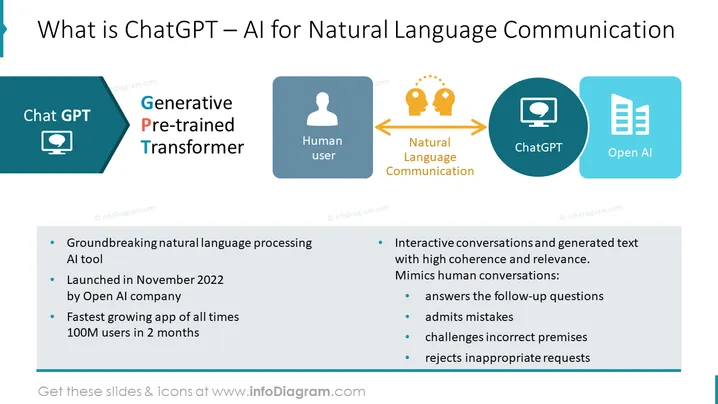
This PowerPoint slide introduces ChatGPT, an AI tool for natural language communication, addressing its capabilities and significance. It defines ChatGPT as a "Generative Pre-trained Transformer," revealing its groundbreaking nature in language processing and emphasizing its rapid user adoption. The tool interacts dynamically, simulating human-like conversations capable of coherent and contextually relevant dialogues. It can respond to follow-up questions, acknowledge errors, challenge inaccuracies, and deny unsuitable requests. This description indicates an advanced level of machine learning reflecting human conversational standards.
Graphical Look
- Title text "What is ChatGPT – AI for Natural Language Communication" is prominently displayed at the top of the slide.
- Two larger sections on the slide: the left side features a teal pentagonal shape with the "Chat GPT" icon and text, and the right side has a flow diagram.
- Left side has three bullet points with text underneath the "Generative Pre-trained Transformer" concept, each accompanied by a bullet icon.
- Right side features a flow diagram with four circular icons, each representing a different element: a computer screen with "ChatGPT," a human silhouette labeled "Human user," a lightbulb with gears "Natural Language Communication," and a document icon labeled "Open AI."
- Arrows connect these icons to demonstrate a flow of communication between the elements.
- The slide uses shades of blue and teal primarily, with orange arrows adding contrast.
The overall look of the slide is clean, with a balanced mix of text and graphical elements. The color scheme is modern and professional, facilitating clear communication of the information.
Use Cases
- To educate stakeholders about the potential and usage of AI tools in enhancing natural language interactions.
- In a sales or marketing presentation, to highlight the innovative aspects of this technology to potential clients or investors.
- During tech conferences or seminars to explain the functions and rapid adoption of ChatG PT in the realm of AI communication tools.
- Within educational settings, as part of a curriculum on emerging technologies, providing students with insights into state-of-the-art AI applications.
How to Edit
How to edit text & colors

How to expand / shorten diagram

How to Replace Icons in infoDiagram PPT


