

Your graphics add a nice touch to my presentations and I recently used them for one of my all-hands meetings. Your toolbox adds professionalism to my slides. Instead of using standard clipart.
Claude Jones, Director of Engineer, @Walmartlabs, USA

Your graphics add a nice touch to my presentations and I recently used them for one of my all-hands meetings. Your toolbox adds professionalism to my slides. Instead of using standard clipart.
Claude Jones, Director of Engineer, @Walmartlabs, USA
I needed a fresh look at some of my slides. I've tried to find a way to create a paintbrush effect, to underline, accentuate, add some color and the handwritten markers were just the things. Very easy to use, easy to size, change the color. It was an affordable, perfect solution and I'm happy to recommend it.
Anonymous, US
The crisp, clean look of the graphics, and the fact that it allowed me to easily edit and change the colors to match the template was my main reason for purchasing them.
Brandie Jenkins, E-learning Developer, USA
##Slide content:
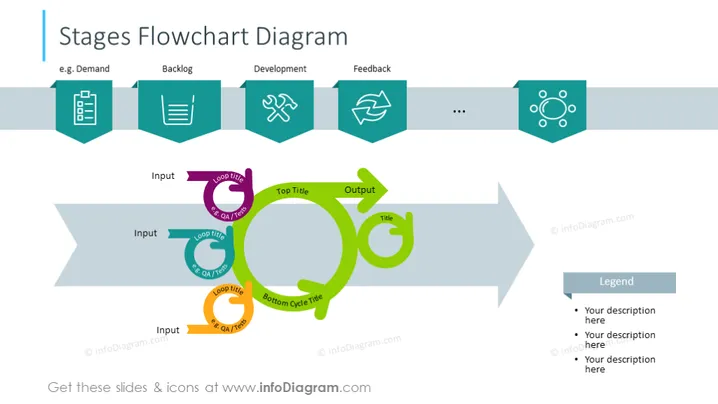
This scrum flowchart process PowerPoint template shows us the scrum workflow with a diagram. The first step is Demand - for a specific product; as next step is Product Backlog - assigning one person to work on this project and placing the priority on top; Development - developing this product with agile methodology; Feedback - the final thoughts on this specific product. This scrum slide is easy to edit and adjust to your needs. Download this scrum process slide in high quality, which is also compatible with Google Slides and Keynote.
##Slide infographics:
Grey Banners, Arrow-Shaped Banner Vector, Bullet Points, Checklist Icon, Hammer and Wrench Icon, Flat Outline Icons, Refresh Icon, Colorful Shapes, Flowchart Diagram



