
Reviews
Ihre Grafiken verleihen meinen Präsentationen eine nette Note, und ich habe sie kürzlich für eines meiner All-Hands-Meetings verwendet. Ihre Toolbox verleiht meinen Folien Professionalität, anstatt Standard-Clipart zu verwenden.
Ich brauchte einen neuen Blick auf einige meiner Folien. Ich habe versucht, einen Weg zu finden, einen Pinselschlag-Effekt zu erzielen, um zu unterstreichen, hervorzuheben, Farbe hinzuzufügen, und die handgeschriebenen Markierungen waren genau das Richtige. Sehr einfach zu bedienen, leicht in der Größe zu ändern, die Farbe zu ändern. Es war eine erschwingliche, perfekte Lösung und ich empfehle sie gerne weiter.
Die klare, saubere Optik der Grafiken und die Tatsache, dass ich die Farben leicht bearbeiten und an die Vorlage anpassen konnte, war mein Hauptgrund für den Kauf.
Description
Agenda List with Icons Example
Slide Content
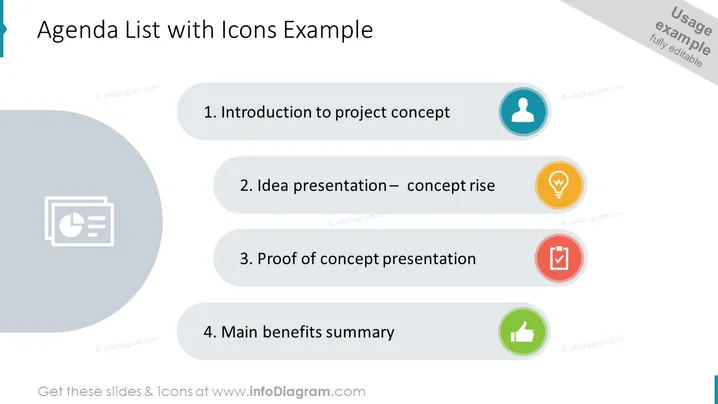
The PowerPoint slide titled "Agenda List with Icons Example" presents a structured overview of a meeting or presentation agenda. It enumerates four items: 1. Introduction to project concept, explaining the initial proposal or idea; 2. Idea presentation – concept rise, which likely references the improvement or evolution of the idea; 3. Proof of concept presentation, referring to evidence that demonstrates the feasibility; 4. Main benefits summary, which summarizes the primary advantages or positive outcomes of the project.
Graphical Look
- The slide features a clean, professional design with a white background.
- A large, semi-transparent grey circular shape is present in the lower-left corner.
- Four items are listed vertically, each with a differently colored circular icon to its right.
- The icons have a simple design and correspond with the text – a person, a lightbulb, a checkmark, and a thumbs-up symbol.
- Each item is separated by a horizontal line, creating a clear visual division.
- The slide employs a mix of serif and sans-serif fonts emphasizing different elements.
The overall look of the slide is modern and user-friendly, with colors and icons that visually distinguish each agenda item. The use of icons next to the text provides an intuitive understanding of each topic.
Use Cases
- To present the key topics of a business meeting, workshop, or seminar.
- To outline the main points of a project launch presentation.
- To summarize the agenda of a training session or educational lecture.
- To provide a visual guide for the sequence of topics during a corporate conference.
How to Edit
How to edit text & colors

How to expand / shorten diagram

How to Replace Icons in infoDiagram PPT


