
Reviews
Sus gráficos añaden un toque agradable a mis presentaciones y recientemente los usé para una de mis reuniones generales. Su conjunto de herramientas añade profesionalismo a mis diapositivas. En lugar de usar imágenes prediseñadas estándar.
Necesitaba un aspecto fresco para algunas de mis diapositivas. Había intentado encontrar una forma de crear un efecto de pincel, de subrayar, acentuar, añadir algo de color y los marcadores escritos a mano fueron justo lo que necesitaba. Muy fácil de usar, fácil de ajustar el tamaño, cambiar el color. Fue una solución asequible y perfecta, y estoy feliz de recomendarla.
El aspecto nítido y limpio de los gráficos, y el hecho de que me permitiera editar y cambiar fácilmente los colores para que coincidieran con la plantilla fue mi principal razón para comprarlos.
Description
African countries
Slide Content
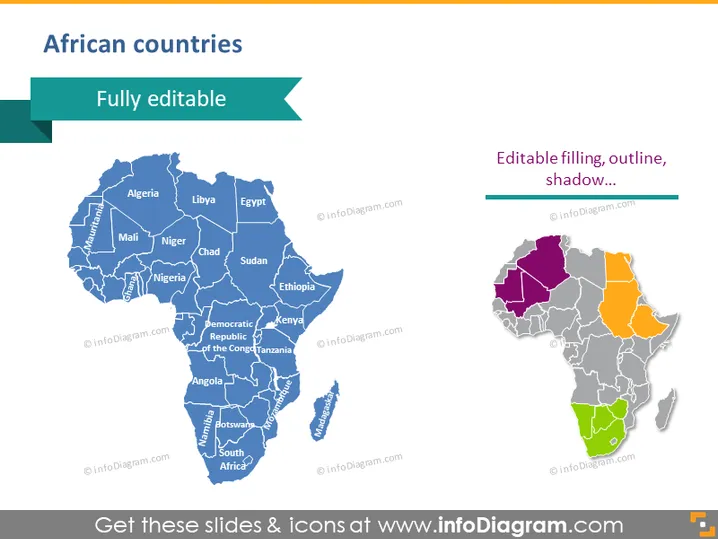
The PowerPoint slide titled "African countries" showcases a map of Africa with editable features. The presentation reflects that each country within the continent can be individually adjusted in terms of filling, outline, and shadow, suggesting flexibility in customization for various presentation needs. The map is divided into states, with a few of them labeled with their names such as Algeria, Nigeria, and South Africa, indicating a geographical educational purpose or a regional analysis in a business context.
Graphical Look
- A large, blue-colored map of Africa occupies the central area of the slide, featuring a detailed outline of all African countries.
- The map of Africa is stylized with shades of blue, and individual countries have visible borders.
- Selected countries on the large map are labeled with their names in white font for identification.
- On the right side, there is a smaller map of Africa highlighting editable elements such as filling, outline, and shadow in different colors (purple, orange, green, and grey).
- A dark green, horizontal banner at the top provides the title "African countries" in white font.
- An aqua-colored ribbon extends from behind the title banner to the left, containing the word "Fully editable" in white font.
- Horizontal lines are placed above and below the text "Editable filling, outline, shadow..." on the right side of the slide, indicating the customizability of the map elements.
The slide has a clean, professional design with a focus on the maps, which are clearly differentiated by their size and selective color highlighting. The overall look is instructional and customizable, appropriate for presentations that require geographic specificity.
Use Cases
- To present geographical data and statistics for different countries within Africa during a business or educational presentation.
- To highlight specific regions in Africa for market analysis or expansion plans in a corporate strategy session.
- For use in non-profit or governmental presentations focusing on development, aid distribution, or program outreach within African countries.
- During academic lectures or seminars to teach about African geography, political boundaries, or to discuss case studies related to various African regions.
How to Edit
How to edit text & colors

How to expand / shorten diagram

How to Replace Icons in infoDiagram PPT


