
Reviews
Sus gráficos añaden un toque agradable a mis presentaciones y recientemente los usé para una de mis reuniones generales. Su conjunto de herramientas añade profesionalismo a mis diapositivas. En lugar de usar imágenes prediseñadas estándar.
Necesitaba un aspecto fresco para algunas de mis diapositivas. Había intentado encontrar una forma de crear un efecto de pincel, de subrayar, acentuar, añadir algo de color y los marcadores escritos a mano fueron justo lo que necesitaba. Muy fácil de usar, fácil de ajustar el tamaño, cambiar el color. Fue una solución asequible y perfecta, y estoy feliz de recomendarla.
El aspecto nítido y limpio de los gráficos, y el hecho de que me permitiera editar y cambiar fácilmente los colores para que coincidieran con la plantilla fue mi principal razón para comprarlos.
Description
Action Plan Template for SME Accounts
Slide Content
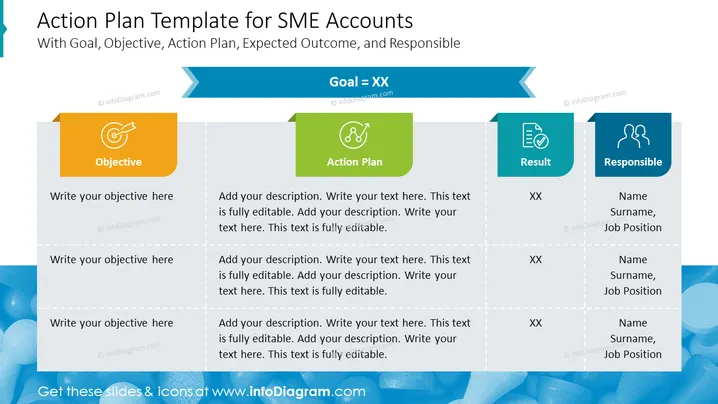
The slide presents a structured template for action planning specific to Small and Medium-sized Enterprise (SME) Accounts. It includes separate sections for "Objective," "Action Plan," "Result," and "Responsible," each with illustrative icons and placeholders for descriptions. "Objective" signifies the goal or aim to achieve. "Action Plan" outlines the steps necessary to reach the objective. "Result" represents the expected outcomes upon completing the action plan. Lastly, "Responsible" indicates the person or team accountable for each part of the plan.
Graphical Look
- The slide background is a soft blue tone with a gentle gradient.
- Four rectangular content boxes sharing a common base line, each with a different color: orange, green, teal, and blue.
- Each content box features a white icon in the upper-left corner, symbolizing "Objective," "Action Plan," "Result," and "Responsible."
- Placeholder text in each box for adding specific content related to objectives, action plans, results, and responsible parties.
- Content boxes are connected by dashed lines, suggesting a logical flow or sequence.
- Slide title is prominent at the top of the slide in a dark blue area with an arrow-shaped cut-out design to the right.
The slide has a clean, professional design with a clear visual hierarchy that guides the viewer through the information in a logical sequence. The color-coding and icons used for each section create an intuitive understanding of the template's components.
Use Cases
- Presenting a project plan and responsibilities in business meetings.
- Outlining steps and targets for sales and marketing strategies.
- Communicating action plans to team members and stakeholders during strategy sessions.
- Tracking progress and accountability in project management updates.
How to Edit
How to edit text & colors

How to expand / shorten diagram

How to Replace Icons in infoDiagram PPT


