

Your graphics add a nice touch to my presentations and I recently used them for one of my all-hands meetings. Your toolbox adds professionalism to my slides. Instead of using standard clipart.
Claude Jones, Director of Engineer, @Walmartlabs, USA

Your graphics add a nice touch to my presentations and I recently used them for one of my all-hands meetings. Your toolbox adds professionalism to my slides. Instead of using standard clipart.
Claude Jones, Director of Engineer, @Walmartlabs, USA
I needed a fresh look at some of my slides. I've tried to find a way to create a paintbrush effect, to underline, accentuate, add some color and the handwritten markers were just the things. Very easy to use, easy to size, change the color. It was an affordable, perfect solution and I'm happy to recommend it.
Anonymous, US
The crisp, clean look of the graphics, and the fact that it allowed me to easily edit and change the colors to match the template was my main reason for purchasing them.
Brandie Jenkins, E-learning Developer, USA
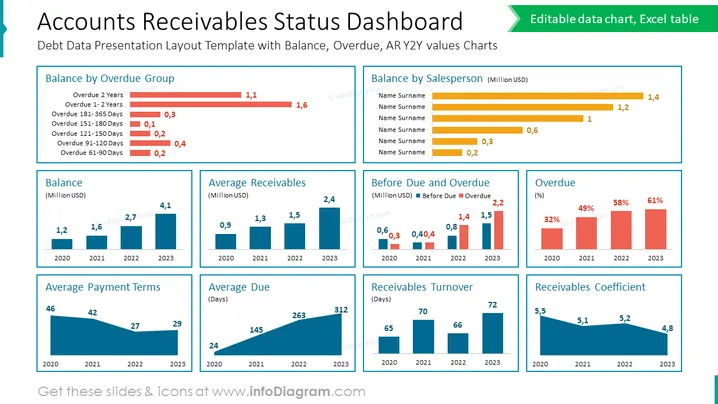
The slide presents a comprehensive dashboard for "Accounts Receivables Status," detailing financial data related to debt management. It includes the following elements: "Balance by Overdue Group," showing the amounts overdue for various time periods; "Balance," "Average Receivables," "Average Payment Terms," and "Average Due" sections depicting financial figures over four years; "Before Due and Overdue" comparing what is before due versus overdue; "Overdue" indicating the percentage of overdue receivables each year; and "Receivables Turnover" and "Receivables Coefficient," showing these metrics' changes over time.
The overall slide design is clean and professional, with a clear distinction between different data sets through the use of varied colors and chart styles. The layout is balanced, with ample white space ensuring that the data is the focal point.



