
Reviews
Your graphics add a nice touch to my presentations and I recently used them for one of my all-hands meetings. Your toolbox adds professionalism to my slides. Instead of using standard clipart.
I needed a fresh look at some of my slides. I've tried to find a way to create a paintbrush effect, to underline, accentuate, add some color and the handwritten markers were just the things. Very easy to use, easy to size, change the color. It was an affordable, perfect solution and I'm happy to recommend it.
The crisp, clean look of the graphics, and the fact that it allowed me to easily edit and change the colors to match the template was my main reason for purchasing them.
Description
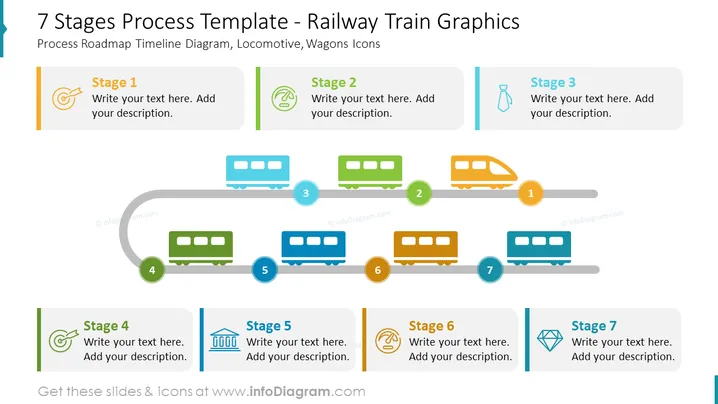
7 Stages Process Template - Railway Train Graphics
Slide Content: The slide is titled "7 Stages Process Template - Railway Train Graphics" and showcases a process roadmap timeline with locomotive and wagon icons representing individual stages. Each stage is accompanied by a space for custom text and description. The stages are sequentially numbered from 1 to 7, seemingly representing a progression or steps in a process. These numbered stages correspond to the train's parts: the locomotive and the wagons. The train metaphor implies a journey or progression through stages in a project, process, or timeline.
Graphical Look:
- The title of the slide is in large, bold, dark text against a light background.
- A curved grey timeline runs horizontally across the slide, resembling railroad tracks.
- Colored train icons (a locomotive and six wagons) are placed along the curved timeline.
- Each train icon has a corresponding numbered circle overlaying it, with numbers 1 to 7.
- Beside each train icon, there is a colored rectangular text box for adding descriptions.
- Text boxes associated with stages have distinct icons and varied colors, such as green, blue, and orange.
- The layout is clean and symmetrical, with each train icon directly aligned with its respective text box.
- The design is flat with minimal shading, using vector graphic style icons for a modern look.
The slide has a clean and modern aesthetic, using a train metaphor to visually represent the stages of a process. The use of consistent icons and colors provides an easy-to-understand and aesthetically pleasing way to present information.
Use Cases:
- Explaining the phases of a project development cycle in a business meeting.
- Outlining the roadmap for product launch in a marketing presentation.
- Detailing step-by-step progress in a strategic plan to stakeholders.
- Presenting a timeline of events or milestones in an organizational change initiative.
How to Edit
How to edit text & colors

How to expand / shorten diagram

How to Replace Icons in infoDiagram PPT


