

Your graphics add a nice touch to my presentations and I recently used them for one of my all-hands meetings. Your toolbox adds professionalism to my slides. Instead of using standard clipart.
Claude Jones, Director of Engineer, @Walmartlabs, USA

Your graphics add a nice touch to my presentations and I recently used them for one of my all-hands meetings. Your toolbox adds professionalism to my slides. Instead of using standard clipart.
Claude Jones, Director of Engineer, @Walmartlabs, USA
I needed a fresh look at some of my slides. I've tried to find a way to create a paintbrush effect, to underline, accentuate, add some color and the handwritten markers were just the things. Very easy to use, easy to size, change the color. It was an affordable, perfect solution and I'm happy to recommend it.
Anonymous, US
The crisp, clean look of the graphics, and the fact that it allowed me to easily edit and change the colors to match the template was my main reason for purchasing them.
Brandie Jenkins, E-learning Developer, USA
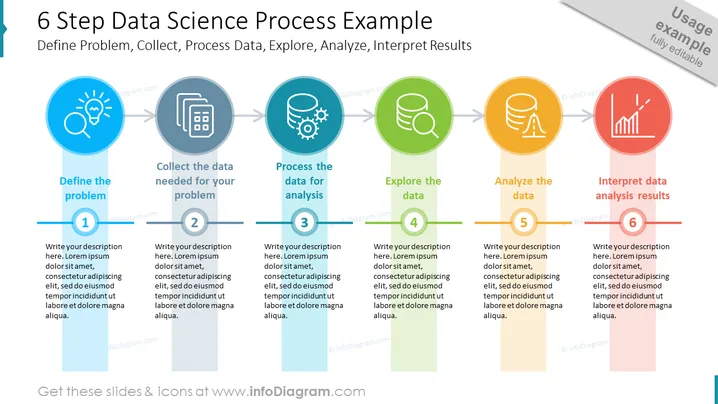
##Slide contents: This PPT Template shows the six steps to analyzing data. The first of the data analysis process is to define the problem. You have to identify the major problem or hypothesis that could be resolved using data. The second step is to collect the data needed for your problem. You need to create a strategy such as a quantitative strategy that includes numbers, or a qualitative strategy which is a descriptive analysis to gather and collect data. Then, you have to process the data for analysis. The fourth step is to explore the data to understand its characteristics. The fifth step is to analyze the data to obtain meaningful visualizations and insights from it. You can do data analysis using four categories. Descriptive analysis determines what has already occurred. Diagnostic analysis determines the reason that something has happened. Predictive analysis uses historical data to know future trends. Prescriptive analysis helps you make future recommendations. The sixth and final step is to interpret data analysis results by choosing the best charts and graphs and sharing them with your audience. You can use this diagram if you are a data analyst who wants to present a data analysis process with results to your company. You can download this template on Google Slides and Keynote.
##Slide Infographic Description: White Background, Colorful Data Science Steps, Text Box, Knowledge Discovery Icon, Multiple Sources Icon, Big Data Icon, Data Collection Icon, Data Processing Icon, Data Analysis Icon, Data Search Icon, Data Analysis Icon, Prediction Icon, Trend Forecasting Icon



