
Reviews
Sus gráficos añaden un toque agradable a mis presentaciones y recientemente los usé para una de mis reuniones generales. Su conjunto de herramientas añade profesionalismo a mis diapositivas. En lugar de usar imágenes prediseñadas estándar.
Necesitaba un aspecto fresco para algunas de mis diapositivas. Había intentado encontrar una forma de crear un efecto de pincel, de subrayar, acentuar, añadir algo de color y los marcadores escritos a mano fueron justo lo que necesitaba. Muy fácil de usar, fácil de ajustar el tamaño, cambiar el color. Fue una solución asequible y perfecta, y estoy feliz de recomendarla.
El aspecto nítido y limpio de los gráficos, y el hecho de que me permitiera editar y cambiar fácilmente los colores para que coincidieran con la plantilla fue mi principal razón para comprarlos.
Description
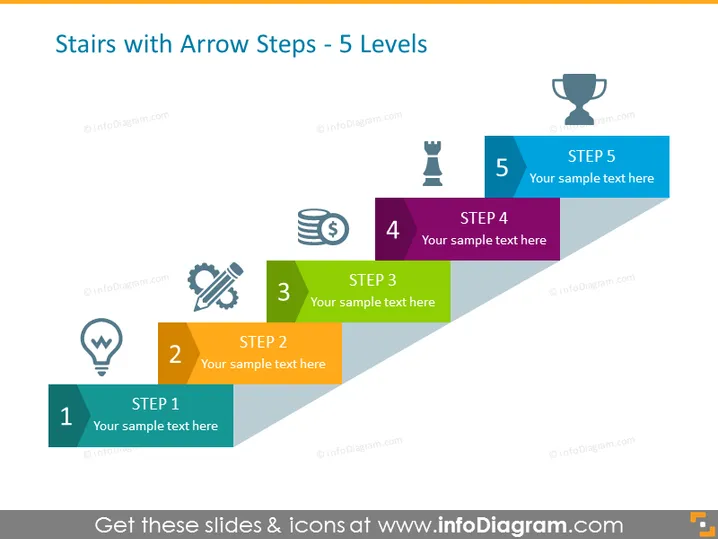
Stairs with Arrow Steps - 5 Levels
Slide Content
This PowerPoint slide visualizes a progression through five distinct levels, symbolized by steps in an ascending staircase. Each step is labeled from "STEP 1" to "STEP 5," with a place for corresponding sample text. The staircase metaphor suggests a progression or a sequence of events or milestones. The steps seem to indicate growth, improvement, or a process that involves multiple stages. Additionally, illustrative icons accompany each step, adding visual cues to each phase, potentially representing different aspects of a progression such as ideation, planning, investment, execution, and achievement of objectives.
Graphical Look
- The figures are arranged to resemble ascending stairs with the overlay of arrow shapes indicating upward movement.
- Each step is a different color, from light blue, yellow, green, purple, to dark blue, which – along with the ascending order – suggests a progression or hierarchy.
- An icon with a thematic association is placed on the left of each step.
- For instance, an idea lightbulb for the first step, gears for the third step, and a trophy for the last.
- The five steps are labeled numerically from 1 to 5, with a uniform "STEP" prefix and a placeholder for text below each number.
- All icons feature a white fill and a colored outline matching the corresponding step color.
- The arrows are designed to fit together, each overlapping a portion of the previous one, reinforcing the sense of progression.
The overall look of this PowerPoint slide is clean and modern, with a strong visual metaphor of progression through the use of stair steps combined with arrows. The use of bright, contrasting colors adds visual interest and aids in distinguishing between the different stages of the process.
Use Cases
- To outline a step-by-step strategy or process during a business presentation, making the sequence of actions clear.
- As a visual aid during project management meetings to describe the phases of project development.
It seems there's no image attached. Could you please provide the image you're referring to?
How to Edit
How to edit text & colors

How to expand / shorten diagram

How to Replace Icons in infoDiagram PPT


