
Reviews
Sus gráficos añaden un toque agradable a mis presentaciones y recientemente los usé para una de mis reuniones generales. Su conjunto de herramientas añade profesionalismo a mis diapositivas. En lugar de usar imágenes prediseñadas estándar.
Necesitaba un aspecto fresco para algunas de mis diapositivas. Había intentado encontrar una forma de crear un efecto de pincel, de subrayar, acentuar, añadir algo de color y los marcadores escritos a mano fueron justo lo que necesitaba. Muy fácil de usar, fácil de ajustar el tamaño, cambiar el color. Fue una solución asequible y perfecta, y estoy feliz de recomendarla.
El aspecto nítido y limpio de los gráficos, y el hecho de que me permitiera editar y cambiar fácilmente los colores para que coincidieran con la plantilla fue mi principal razón para comprarlos.
Description
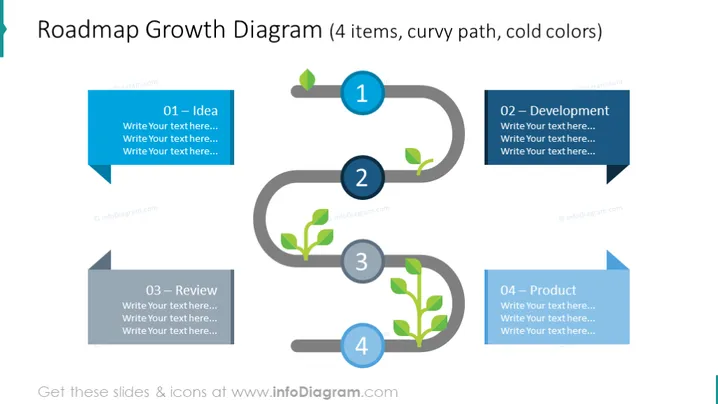
Roadmap Growth Diagram - 4 items
Slide Content:
The slide is designed to represent a growth roadmap, detailing the progression of a project or product from inception to completion. It consists of four sequential stages: "01 – Idea," where initial concepts are generated; "02 – Development," where those ideas begin to take shape; "03 – Review," where the developments are evaluated and refined; and "04 – Product," which represents the final, market-ready outcome. Each stage is meant to be described in the text placeholders provided.
Graphical Look:
- A curvy, grey path that interconnects four different stages, creating a visual flow from left to right.
- Each stage is marked by a circular node with a leaf icon inside, symbolizing growth, and a number indicating the sequence.
- Colored banner-like text boxes adjacent to each node, varying in shades of blue, where text can be added.
- The nodes are connected by a path that curves around each point, emphasizing the idea of progression and development.
The overall design is sleek and modern, using a path with nodes to effectively represent a development journey. The use of cold colors and clean lines gives the slide a professional and polished appearance.
Use Cases:
- To illustrate the timeline of a project from concept to launch in business strategy meetings.
- As a visual aid in product development discussions to outline key milestones.
- For presentations to investors, detailing the stages of company growth or product maturation.
- In educational settings, to explain the step-by-step process of bringing an idea to fruition.
How to Edit
How to edit text & colors

How to expand / shorten diagram

How to Replace Icons in infoDiagram PPT


