
Reviews
Sus gráficos añaden un toque agradable a mis presentaciones y recientemente los usé para una de mis reuniones generales. Su conjunto de herramientas añade profesionalismo a mis diapositivas. En lugar de usar imágenes prediseñadas estándar.
Necesitaba un aspecto fresco para algunas de mis diapositivas. Había intentado encontrar una forma de crear un efecto de pincel, de subrayar, acentuar, añadir algo de color y los marcadores escritos a mano fueron justo lo que necesitaba. Muy fácil de usar, fácil de ajustar el tamaño, cambiar el color. Fue una solución asequible y perfecta, y estoy feliz de recomendarla.
El aspecto nítido y limpio de los gráficos, y el hecho de que me permitiera editar y cambiar fácilmente los colores para que coincidieran con la plantilla fue mi principal razón para comprarlos.
Description
This chart is Data-Driven Excel Chart
Slide Content
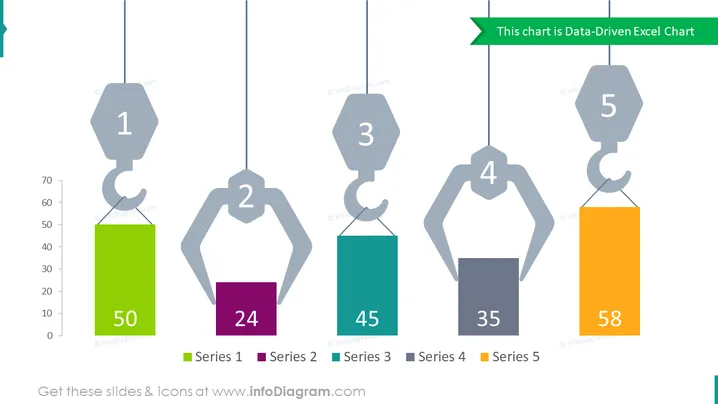
The PowerPoint slide presents a data-driven chart, illustrating five different data series represented by lifting hooks with attached bars, indicating numerical values. Each hook is labeled with a number corresponding to a series, and the bars are color-coded to differentiate between the series. Series 1 has a value of 50, Series 2 shows 24, Series 3 is at 45, Series 4 stands at 35, and Series 5 has the highest value of 58.
- Series 1 means data corresponding to the first category or group.
- Series 2 indicates data related to the second distinct category.
- Series 3 represents information associated with the third category.
- Series 4 contains data for the fourth category.
- Series 5 denotes the fifth set of data and appears to have the highest value among the presented series.
Graphical Look
- The slide features crane hooks as icons to represent data points.
- Color-coded bars are suspended from each hook, signifying the values of data points.
- Numbers inside the hooks correlate with the series labels at the bottom.
- The slide background is white, providing a clean contrast for the colored elements.
- The legend at the bottom of the slide assigns colors to each data series.
- There's a horizontal green banner at the top with the title of the chart.
The overall look of the slide is minimalist and modern, with a creative twist on representing data through crane hooks and bars. The colors are vibrant and distinct, making it easy to differentiate between the data series.
Use Cases
- Presenting sales data for different product lines in a quarterly business review.
- Illustrating progress on various project milestones in a project management update.
- Comparing performance metrics across multiple departments in an annual company report.
- Showcasing survey results with multiple answer options in a market research presentation.
How to Edit
How to edit text & colors

How to expand / shorten diagram

How to Replace Icons in infoDiagram PPT


