
Reviews
Ihre Grafiken verleihen meinen Präsentationen eine nette Note, und ich habe sie kürzlich für eines meiner All-Hands-Meetings verwendet. Ihre Toolbox verleiht meinen Folien Professionalität, anstatt Standard-Clipart zu verwenden.
Ich brauchte einen neuen Blick auf einige meiner Folien. Ich habe versucht, einen Weg zu finden, einen Pinselschlag-Effekt zu erzielen, um zu unterstreichen, hervorzuheben, Farbe hinzuzufügen, und die handgeschriebenen Markierungen waren genau das Richtige. Sehr einfach zu bedienen, leicht in der Größe zu ändern, die Farbe zu ändern. Es war eine erschwingliche, perfekte Lösung und ich empfehle sie gerne weiter.
Die klare, saubere Optik der Grafiken und die Tatsache, dass ich die Farben leicht bearbeiten und an die Vorlage anpassen konnte, war mein Hauptgrund für den Kauf.
Description
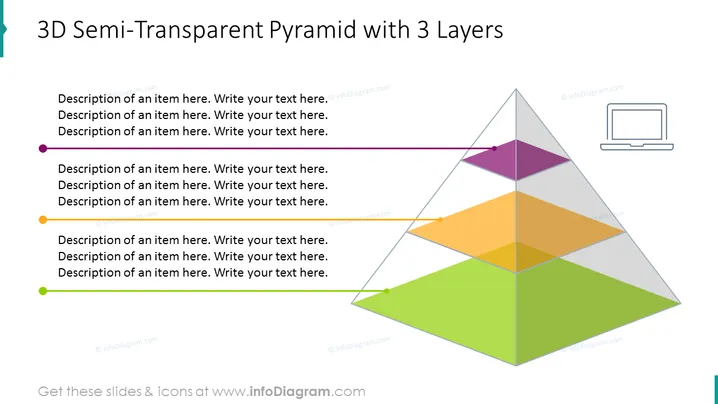
3D Semi-Transparent Pyramid with 3 Layers
Slide Content
The slide presents a stylized, 3D semi-transparent pyramid with three distinct layers, each associated with a different color and a bullet point for detailed descriptions. The top layer is violet, the middle is orange, and the bottom is green, indicating a hierarchy or stages in a process. This graphical element could be used to represent a business model, organizational structure, or a stepwise approach where each step builds on the previous one.
Graphical Look
- A large semi-transparent pyramid graphic dominates the slide, divided horizontally into three layers.
- Each layer has a distinct color: violet on the top, orange in the middle, and green at the bottom.
- There are three bullet points aligned horizontally with each layer of the pyramid.
- Colored circles correspond with the color of each pyramid layer and are placed next to the bullet points.
- A small laptop icon is on the right side, outside the pyramid.
- The background of the slide is plain white, highlighting the pyramid graphic.
Overall, the slide has a clean and modern look, with a prominent graphical element that clearly communicates a layered structure with its use of color and transparency.
Use Cases
- To showcase a company's organizational hierarchy, with each layer representing a different level of management or operation.
- In a marketing presentation to illustrate a product's tiered features or a multi-step customer journey.
- For educational purposes, such as explaining the levels of a food chain or the stages of a scientific process.
- During strategic planning meetings to discuss the layers of business development or project milestones.
How to Edit
How to edit text & colors

How to expand / shorten diagram

How to Replace Icons in infoDiagram PPT


