
Reviews
Deine Folien sind meine 'geheime Zutat', wenn es darum geht, meine Ideen Kunden zu visualisieren. Ich spare so viel Zeit.
Ihre Folien führen oft zu guten Kommentaren und Ideen meines Teams, die die endgültigen Folien verbessern.
Description
Multi-Level Diagram Template with 3D Layers Graphics – 5 Items
Slide Content
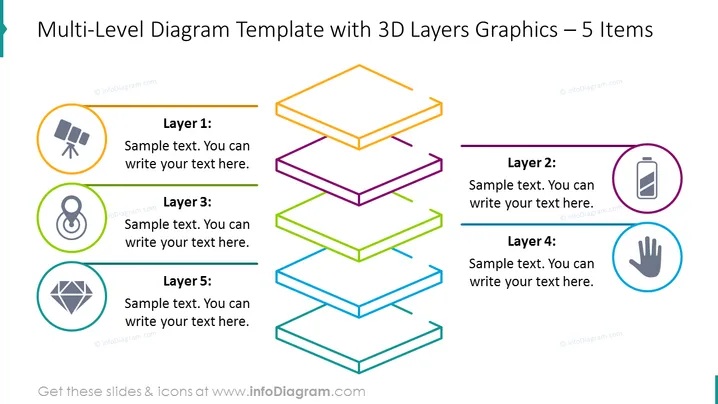
The PowerPoint slide is titled "Multi-Level Diagram Template with 3D Layers Graphics – 5 Items" and depicts a five-layered 3D graphic. Each layer is associated with a different icon and placeholder text.
- Layer 1 is paired with a telescope icon symbolizing vision or exploration.
- Layer 2 features a battery icon which could represent energy or resources.
- Layer 3 is linked to a link chain symbol, possibly indicating connectivity or security.
- Layer 4 shows a hand icon, which might stand for assistance or a user-focused approach.
- Layer 5 has a diamond icon, potentially signifying quality or value.
Graphical Look
- The slide has a title in large, bold text at the top.
- A vibrant, multicolored 3D layered diagram occupies the center, creating a visual effect of stacked layers.
- Five colorful layers are stacked on top of each other, each outlined in a different color (orange, purple, green, blue, and cyan).
- Next to each layer, there is a corresponding colored line that connects to a circular icon and a text box for descriptions.
- Each icon is encircled with a matching colored outline, reinforcing the color coding of the layers.
- Icons are simplistic and include a telescope, battery, link chain, hand, and diamond, symbolizing different concepts.
The slide has a clean and modern design, utilizing color-coding and 3D graphics to differentiate the layers. The icons are simple yet striking, aiding in the communication of each layer's purpose or theme.
Use Cases
- To present a business model or strategy that has multiple components or levels.
- To illustrate the structure of an organization, showing hierarchy or functional layers.
- To describe a step-by-step process in product development or project management.
- To showcase the layers of a complex system or service, explaining how different elements interrelate.
How to Edit
How to edit text & colors

How to expand / shorten diagram

How to Replace Icons in infoDiagram PPT


