
Reviews
Ihre Grafiken verleihen meinen Präsentationen eine nette Note, und ich habe sie kürzlich für eines meiner All-Hands-Meetings verwendet. Ihre Toolbox verleiht meinen Folien Professionalität, anstatt Standard-Clipart zu verwenden.
Ich brauchte einen neuen Blick auf einige meiner Folien. Ich habe versucht, einen Weg zu finden, einen Pinselschlag-Effekt zu erzielen, um zu unterstreichen, hervorzuheben, Farbe hinzuzufügen, und die handgeschriebenen Markierungen waren genau das Richtige. Sehr einfach zu bedienen, leicht in der Größe zu ändern, die Farbe zu ändern. Es war eine erschwingliche, perfekte Lösung und ich empfehle sie gerne weiter.
Die klare, saubere Optik der Grafiken und die Tatsache, dass ich die Farben leicht bearbeiten und an die Vorlage anpassen konnte, war mein Hauptgrund für den Kauf.
Description
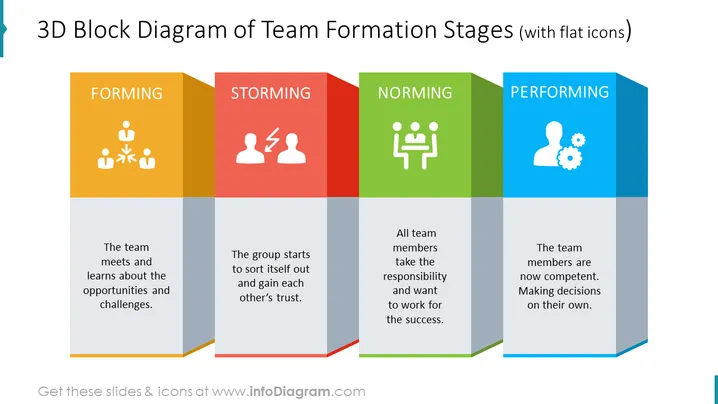
Group Development 3D Diagram slide content
Make your slide look more unique and professional with a 3D block diagram. It will make your information look less overwhelming and easier to understand. The representative icons will add that varied touch, and break the monotony from slides stuffed with too much text and too little abstracts. All the graphics are editable, so you can adjust them according to your needs. The development group 3D diagram slide is part of the Group Developments and Dynamic Charts PowerPoint Template. Click on the picture for more illustrations. The presentation is compatible with Google Slides and Keynote too.
Group Development 3D Diagram slide infographics:
3D Block Diagram, Group Forming Icon, Brainstorming Icon, Work Norm Icon, Man With Gear Performance Icon
How to Edit
How to edit text & colors

How to expand / shorten diagram

How to Replace Icons in infoDiagram PPT


