
Reviews
Ihre Grafiken verleihen meinen Präsentationen eine nette Note, und ich habe sie kürzlich für eines meiner All-Hands-Meetings verwendet. Ihre Toolbox verleiht meinen Folien Professionalität, anstatt Standard-Clipart zu verwenden.
Ich brauchte einen neuen Blick auf einige meiner Folien. Ich habe versucht, einen Weg zu finden, einen Pinselschlag-Effekt zu erzielen, um zu unterstreichen, hervorzuheben, Farbe hinzuzufügen, und die handgeschriebenen Markierungen waren genau das Richtige. Sehr einfach zu bedienen, leicht in der Größe zu ändern, die Farbe zu ändern. Es war eine erschwingliche, perfekte Lösung und ich empfehle sie gerne weiter.
Die klare, saubere Optik der Grafiken und die Tatsache, dass ich die Farben leicht bearbeiten und an die Vorlage anpassen konnte, war mein Hauptgrund für den Kauf.
Description
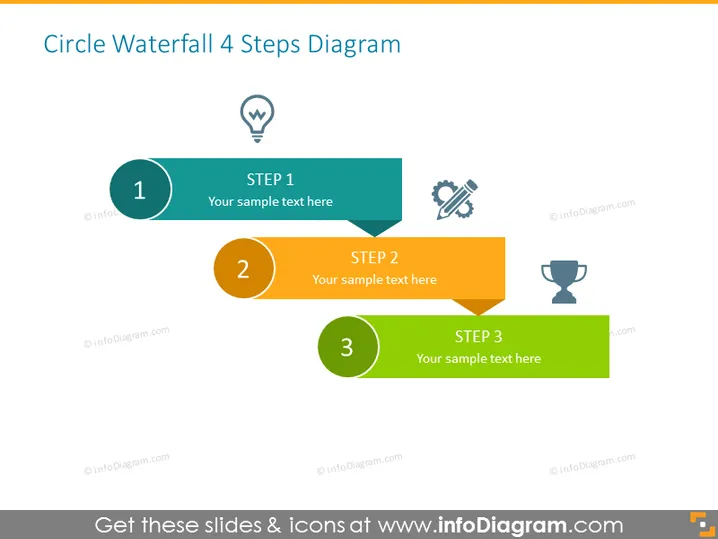
Circle Waterfall 4 Steps Diagram
Slide Content
The "Circle Waterfall 4 Steps Diagram" slide outlines a four-step sequential process with space for text description. Step 1 is associated with an idea or lightbulb, indicating a concept or initiation phase. Step 2 features a wrench and a screw, symbolizing a development or construction phase. Step 3 is paired with a trophy icon, suggesting a phase of achievement or goal realization. The fourth step is not shown, hinting that the process continues beyond what is presented.
Graphical Look
- The slide uses a flat design with simple geometric shapes and minimalist icons.
- Each step is indicated by a circular shape connected to a rectangular speech bubble-like shape for additional text.
- The colors progress from teal for Step 1, to yellow for Step 2, and to green for Step 3, suggesting a thematic or logical progression.
- Each circle contains a white number signifying the step's order within the process.
- Next to each number in the circle is a distinct icon corresponding to the step's theme.
- The background is plain white, which highlights the colorful step elements.
The slide exhibits a clean and modern visual style with clear delineation between the steps. The use of colors helps to differentiate and visually organize the information presented.
Use Cases
- Presenting a business project's lifecycle from conception to execution and success.
- Illustrating a step-by-step guide for a workflow or process in a training presentation.
- Outlining the phases of product development in a marketing or sales pitch.
- Demonstrating sequential milestones in a project timeline during a status update meeting.
How to Edit
How to edit text & colors

How to expand / shorten diagram

How to Replace Icons in infoDiagram PPT


