
Reviews
Ihre Grafiken verleihen meinen Präsentationen eine nette Note, und ich habe sie kürzlich für eines meiner All-Hands-Meetings verwendet. Ihre Toolbox verleiht meinen Folien Professionalität, anstatt Standard-Clipart zu verwenden.
Ich brauchte einen neuen Blick auf einige meiner Folien. Ich habe versucht, einen Weg zu finden, einen Pinselschlag-Effekt zu erzielen, um zu unterstreichen, hervorzuheben, Farbe hinzuzufügen, und die handgeschriebenen Markierungen waren genau das Richtige. Sehr einfach zu bedienen, leicht in der Größe zu ändern, die Farbe zu ändern. Es war eine erschwingliche, perfekte Lösung und ich empfehle sie gerne weiter.
Die klare, saubere Optik der Grafiken und die Tatsache, dass ich die Farben leicht bearbeiten und an die Vorlage anpassen konnte, war mein Hauptgrund für den Kauf.
Description
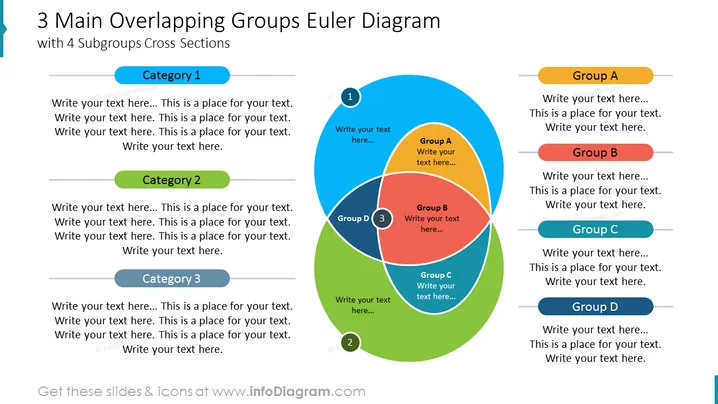
3 Main Overlapping Groups Euler Diagram
with 4 Subgroups Cross Sections
Slide Content
This PowerPoint slide presents an Euler diagram illustrating the intersection of 3 main groups, each with potential subgroup intersections. There are text placeholders for each category and group, to be customized with specific information. 'Category 1', 'Category 2', and 'Category 3' are arrayed horizontally on the left with corresponding text blocks. On the right side, 'Group A', 'Group B', 'Group C', and 'Group D' are presented in a similar manner. Inside the diagram, there are four intersection areas, marked from 'Group A' to 'Group D', with 'Group D' being at the center representing a common subset.
Graphical Look
- A large, bold title in dark blue at the top declares the slide topic.
- Subtitle text in smaller font size under the title provides additional explanation.
- Text placeholders in boxes labeled as 'Category 1', 'Category 2', and 'Category 3' are aligned on the left of the slide, each with a thin colored line.
- Text boxes for 'Group A', 'Group B', 'Group C', and 'Group D' to the right, similar to the category boxes, but with different colors.
- In the center, an interlocking Euler diagram in shades of blue, green, red, and orange illustrates the relationships between the groups.
- Numbered markers (1, 2, 3) within the diagram indicate specific intersection points for additional details.
- The background is white, offering a clear contrast to the colored elements.
The slide is colorful with a balanced layout, using both color and space to distinguish among categories and groups. The Euler diagram is the central focus; it uses transparency to visually represent overlapping relationships.
Use Cases
- To explain the intersections and relationships between different business units or project teams.
- For presenting market segmentation where multiple segments intersect with product features or consumer demographics.
- In educational settings to describe concepts with overlapping traits or interdisciplinary fields.
- To illustrate strategic alliances or partnerships where organizations have shared interests or objectives.
How to Edit
How to edit text & colors

How to expand / shorten diagram

How to Replace Icons in infoDiagram PPT


