
Reviews
Deine Folien sind meine 'geheime Zutat', wenn es darum geht, meine Ideen Kunden zu visualisieren. Ich spare so viel Zeit.
Ihre Folien führen oft zu guten Kommentaren und Ideen meines Teams, die die endgültigen Folien verbessern.
Description
3 KPI Values Presentation Template, Hexagonal Elements
Slide Content
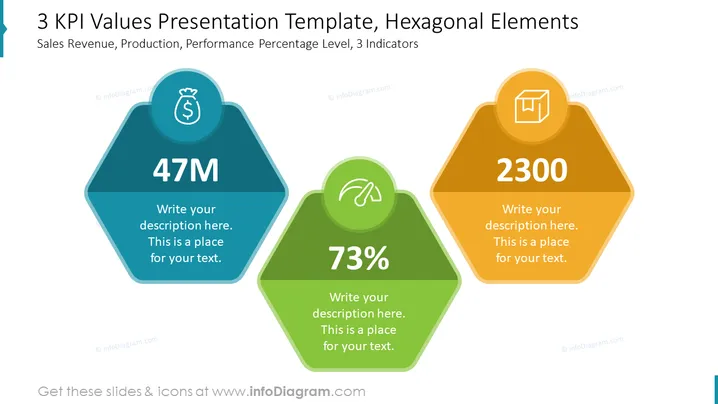
The slide titled "3 KPI Values Presentation Template, Hexagonal Elements" showcases three key performance indicators (KPIs): Sales Revenue, Production, and Performance Percentage Level. Each KPI is represented by a hexagon with a distinct color—blue for Sales Revenue (47M), green for Performance Level (73%), and orange for Production (2300). Under each KPI value, there is a placeholder for additional text to provide more detail about the respective metric.
Graphical Look
- The slide background is plain white, providing a neutral backdrop for the content.
- Three hexagonal shapes are aligned horizontally across the slide, each one with a different color (blue, green, and orange) and a light shadow effect, giving a sense of depth.
- Inside each hexagon, at the top, there is a white circle with an icon: a money bag for Sales Revenue, a speedometer for Performance Level, and a factory for Production.
- A large bold number is centered within each hexagon representing the KPI value: "47M" for Sales Revenue, "73%" for Performance Level, and "2300" for Production.
- Below the numbers, there is a text field with placeholder text "Write your description here. This is a place for your text." in each hexagon, suggesting customization by the presenter.
The slide has a clean and modern visual design, with a balanced use of color and space making the KPI data stand out. The use of hexagons provides a geometric contrast that's visually appealing and directs focus to the key figures.
Use Cases
- Presenting quarterly business results to stakeholders by showcasing revenue, production output, and performance metrics in a clear and concise manner.
- Reporting department-specific KPIs during team meetings or performance reviews to give a snapshot of performance against specified targets.
- Creating a dashboard overview of critical metrics for a business pitch or investment presentation to highlight company strengths in key areas.
- Summarizing project status updates to display progress in terms of budget, timelines, and deliverables to project teams or clients.
How to Edit
How to edit text & colors

How to expand / shorten diagram

How to Replace Icons in infoDiagram PPT


