
Reviews
Ihre Grafiken verleihen meinen Präsentationen eine nette Note, und ich habe sie kürzlich für eines meiner All-Hands-Meetings verwendet. Ihre Toolbox verleiht meinen Folien Professionalität, anstatt Standard-Clipart zu verwenden.
Ich brauchte einen neuen Blick auf einige meiner Folien. Ich habe versucht, einen Weg zu finden, einen Pinselschlag-Effekt zu erzielen, um zu unterstreichen, hervorzuheben, Farbe hinzuzufügen, und die handgeschriebenen Markierungen waren genau das Richtige. Sehr einfach zu bedienen, leicht in der Größe zu ändern, die Farbe zu ändern. Es war eine erschwingliche, perfekte Lösung und ich empfehle sie gerne weiter.
Die klare, saubere Optik der Grafiken und die Tatsache, dass ich die Farben leicht bearbeiten und an die Vorlage anpassen konnte, war mein Hauptgrund für den Kauf.
Description
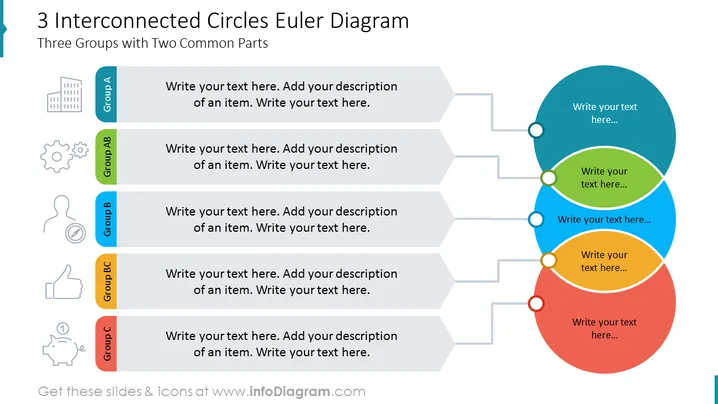
3 Interconnected Circles Euler Diagram
Slide Content
The slide presents a 3 Interconnected Circles Euler Diagram titled "Three Groups with Two Common Parts." It is designed to illustrate the relationship and overlap among three distinct groups. Group A, Group B, and Group C are labeled beside their respective icons, each followed by customizable text boxes for detailed descriptions indicating how the items or concepts within each group are related or unique. The Group AB section suggests an intersection or commonality between Group A and B, whereas Group BC indicates an overlap between Group B and C.
Graphical Look
- The slide features a large, bold title in dark blue at the top left corner.
- A teal vertical band aligns with the left edge of the slide.
- Three stylized icons parallel to the teal band represent each group: a building for Group A, gears for Group AB, a human silhouette for Group B, a thumbs-up for Group BC, and a piggy bank for Group C.
- To the right of the icons, five grey text boxes with arrows pointing to circles provide space for annotations.
- Three overlapping circles in blue, green, and red are aligned to the right, representing the Venn diagram.
- White connecting circles placed on the intersections link to the corresponding descriptions.
The slide has a clean, professional look with a balance between graphic elements and space for text. The use of colors helps differentiate the groups and their intersections visually.
Use Cases
- Explaining complex relationships between different business units or project teams during a strategic presentation.
- Illustrating customer segments overlap in a marketing strategy meeting.
- Presenting research data that shows common characteristics or differences among various groups in an academic conference.
- Demonstrating product features that cater to different market needs during a product development update.
How to Edit
How to edit text & colors

How to expand / shorten diagram

How to Replace Icons in infoDiagram PPT


