
Reviews
Ihre Grafiken verleihen meinen Präsentationen eine nette Note, und ich habe sie kürzlich für eines meiner All-Hands-Meetings verwendet. Ihre Toolbox verleiht meinen Folien Professionalität, anstatt Standard-Clipart zu verwenden.
Ich brauchte einen neuen Blick auf einige meiner Folien. Ich habe versucht, einen Weg zu finden, einen Pinselschlag-Effekt zu erzielen, um zu unterstreichen, hervorzuheben, Farbe hinzuzufügen, und die handgeschriebenen Markierungen waren genau das Richtige. Sehr einfach zu bedienen, leicht in der Größe zu ändern, die Farbe zu ändern. Es war eine erschwingliche, perfekte Lösung und ich empfehle sie gerne weiter.
Die klare, saubere Optik der Grafiken und die Tatsache, dass ich die Farben leicht bearbeiten und an die Vorlage anpassen konnte, war mein Hauptgrund für den Kauf.
Description
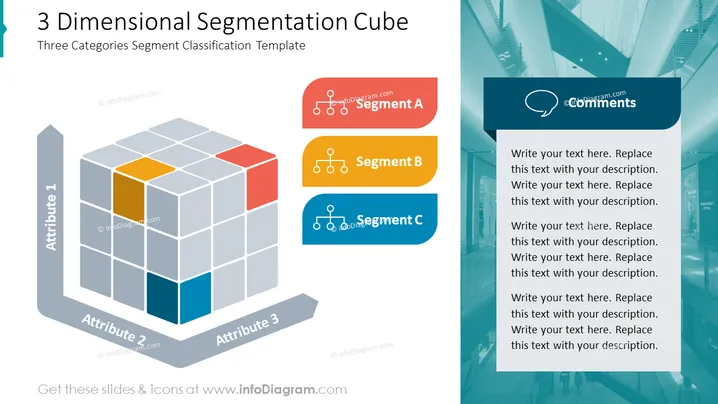
3 Dimensional Segmentation Cube
Slide Content
The slide presents a "Three Categories Segment Classification Template" for organizing or classifying data into three segments based on three attributes. A 3D cube is displayed, segmented into various blocks, each representing a data point. There are three colored blocks that stand out, representing the segmentation into Segment A (red), Segment B (yellow), and Segment C (blue). Each segment is further detailed by the use of symbols indicating a group or set, likely signifying a subset of data or a category within that segment.
Graphical Look
- A large, grey, three-dimensional cube occupies the left-hand side of the slide, composed of many smaller transparent cubes with three visible faces each.
- The cube features three distinct colors—red, yellow, and blue—on select blocks within the cube structure, visually indicating different segments.
- To the left of the cube, vertically aligned, are three elongated, rounded rectangular bars, each gray with white text, labeled "Attribute 1," "Attribute 2," and "Attribute 3."
- On the right side of the slide, there are three colored banners or tabs labeled "Segment A," "Segment B," and "Segment C," in red, yellow, and blue, respectively, matching the colors used in the cube.
- Each of these banners contains a white icon featuring a simple graphic of connected dots and lines, suggesting a network or relationships between elements.
- Above the banners, a speech bubble icon labeled "Comments" indicates a placeholder for additional text or commentary related to the segments.
- The main backdrop of the slide is a faint, modern architectural image, giving a corporate and contemporary feel to the design.
The slide is modern and professional in appearance, with a color-coordinated design that effectively uses shapes and colors to differentiate between elements. The 3D cube creates an engaging visual focus, while the side panels and icons provide clear avenues for content organization and explanation.
Use Cases
- Explaining the multi-faceted segmentation process in a market analysis presentation, where each segment may represent a different customer demographic or product category.
- Visualizing the relationship between three different business metrics such as regional sales, product lines, and time periods in a quarterly business review.
- Providing an overview of a complex data model in a research or educational setting, where a multi-dimensional approach needs to be communicated clearly.
- Structuring a strategic plan by aligning objectives across three key business areas, such as operations, finance, and marketing, in a management meeting.
How to Edit
How to edit text & colors

How to expand / shorten diagram

How to Replace Icons in infoDiagram PPT


