
Reviews
Deine Folien sind meine 'geheime Zutat', wenn es darum geht, meine Ideen Kunden zu visualisieren. Ich spare so viel Zeit.
Ihre Folien führen oft zu guten Kommentaren und Ideen meines Teams, die die endgültigen Folien verbessern.
Description
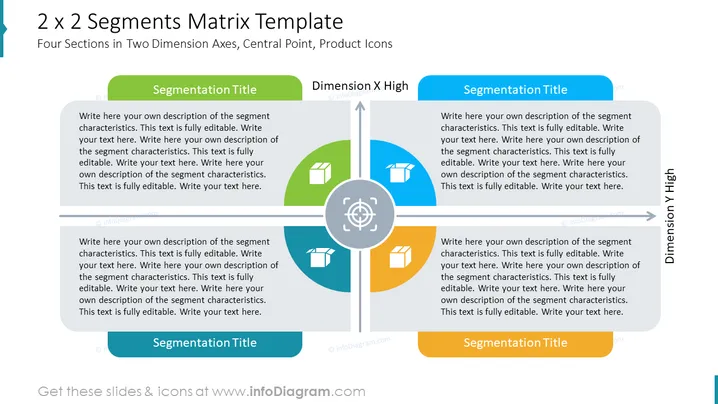
2 x 2 Segments Matrix Template
Slide Content
The slide titled "2 x 2 Segments Matrix Template" depicts a matrix with four quadrants for categorizing information based on two dimensions. Each quadrant has a space for a title and a text area to describe the segment's characteristics or provide additional information. The term "Segmentation Title" implies the user should label each segment, while "Dimension X High" and "Dimension Y High" suggest metrics or criteria to evaluate the segments. Each text area encourages the user to insert a comprehensive description that is fully editable.
Graphical Look
- The slide has a light blue and white color scheme, with orange accents in the central axis point and quadrant dividing lines.
- There are four main quadrants labeled with placeholder text "Segmentation Title" for potential categorization; each quadrant is equally sized.
- Each quadrant has a colored icon—a green square, a blue document, a blue gear, and a green building, respectively—indicating spaces for customizable graphics related to each category.
- A vertical grey arrow labeled "Dimension X High" and a horizontal grey arrow labeled "Dimension Y High" intersect at the center, creating the matrix structure.
- The center point where the two axes intersect is highlighted with an orange circle containing a white crosshair icon, representing a focal or central point.
- Each quadrant contains a white placeholder textbox with a grey border where descriptive text can be added.
- The overall design is clean and balanced with clear delineation between the segments. The overall look of the slide suggests a professional and structured approach to segmenting information visually. The color-coded icons and text areas are designed for clarity and ease of customization.
Use Cases
- To illustrate market segmentation in a marketing strategy presentation.
- To classify products or services based on two key performance dimensions in a business analysis.
- To explain strategic business units or different customer groups in a corporate training seminar.
- To visually summarize research data categorization in an academic or professional research presentation.
How to Edit
How to edit text & colors

How to expand / shorten diagram

How to Replace Icons in infoDiagram PPT


