
Reviews
Your graphics add a nice touch to my presentations and I recently used them for one of my all-hands meetings. Your toolbox adds professionalism to my slides. Instead of using standard clipart.
I needed a fresh look at some of my slides. I've tried to find a way to create a paintbrush effect, to underline, accentuate, add some color and the handwritten markers were just the things. Very easy to use, easy to size, change the color. It was an affordable, perfect solution and I'm happy to recommend it.
The crisp, clean look of the graphics, and the fact that it allowed me to easily edit and change the colors to match the template was my main reason for purchasing them.
Description
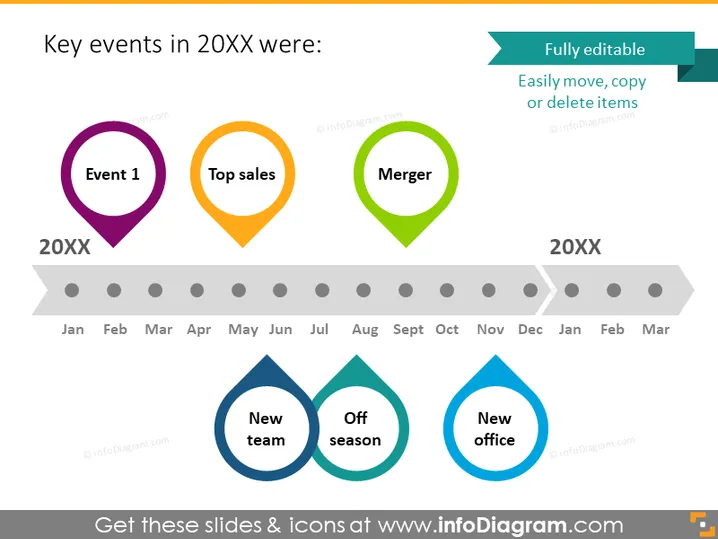
Key events in 20XX were:
Slide Content
The slide lists three key events that took place in an unspecified year, denoted as "20XX". Event 1, Top sales, and Merger are marked across an annual timeline, indicating their respective occurrences throughout the year. "Event 1" likely signifies an important occurrence, while "Top sales" implies a period with the highest sales volume, and "Merger" suggests a significant corporate consolidation.
Graphical Look
- The slide title is in a bold, large font at the top.
- There are three circular icons, each containing a different text label ("Event 1," "Top sales," "Merger") and uniquely colored (purple, orange, green).
- A timeline runs horizontally across the slide with months labeled from "Jan" to "Mar," indicating a year.
- Each event icon is connected to the timeline with a gray line, showing the point in time the event occurred.
- At the bottom, there are three drop-shaped icons in two shades of blue, labeled "New team," "Off season," and "New office."
- A text box in the top right corner says "Fully editable" and "Easily move, copy or delete items."
The slide has a clean, professional look with a color scheme that utilizes shades of blue, purple, orange, and green. The icons are simple yet distinct, facilitating quick comprehension of the events' nature and timing.
Use Cases
- Outlining the timeline of key milestones during a company’s fiscal year.
- Reviewing annual performance highlights in a corporate meeting.
- Presenting a summary of significant events in an annual report.
- Using as a visual aid during strategy planning sessions to mark past or future planned events.
How to Edit
How to edit text & colors

How to expand / shorten diagram

How to Replace Icons in infoDiagram PPT


