

Your graphics add a nice touch to my presentations and I recently used them for one of my all-hands meetings. Your toolbox adds professionalism to my slides. Instead of using standard clipart.
Claude Jones, Director of Engineer, @Walmartlabs, USA

Your graphics add a nice touch to my presentations and I recently used them for one of my all-hands meetings. Your toolbox adds professionalism to my slides. Instead of using standard clipart.
Claude Jones, Director of Engineer, @Walmartlabs, USA
I needed a fresh look at some of my slides. I've tried to find a way to create a paintbrush effect, to underline, accentuate, add some color and the handwritten markers were just the things. Very easy to use, easy to size, change the color. It was an affordable, perfect solution and I'm happy to recommend it.
Anonymous, US
The crisp, clean look of the graphics, and the fact that it allowed me to easily edit and change the colors to match the template was my main reason for purchasing them.
Brandie Jenkins, E-learning Developer, USA
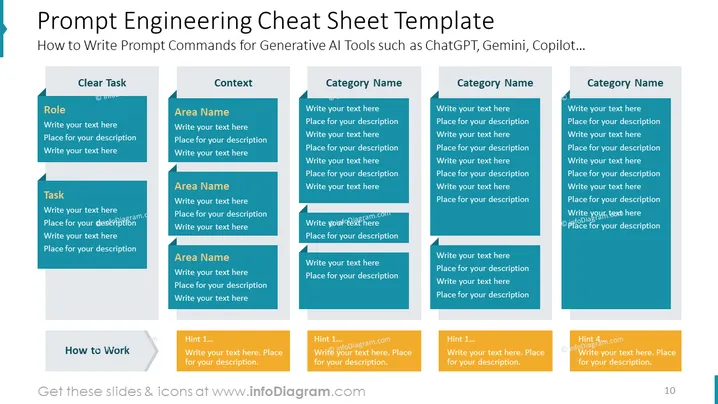
The PowerPoint slide titled "Prompt Engineering Cheat Sheet Template" is aimed at guiding users on how to construct prompt commands for various generative AI tools, such as ChatGPT, Gemini, and Copilot. The slide is organized into five vertical sections, each with sub-titles including "Clear Task," "Context," and three with "Category Name." Under these headings, sub-categories like "Role," "Task," and "Area Name," followed by placeholders for texts and descriptions, suggest that the slide is meant for detailed prompt structuring for AI interactions. Each sub-category expands on different aspects: "Role" to define the position or function of the AI, "Task" for the specific job the AI should perform, and "Area Name" for the context or domain of the prompts.
The overall look of the slide is clean, professional, and organized, using a consistent color palette that enables easy distinction between sections and categories. The visual cues provided by the shapes and colors are designed to guide the user in formulating structured prompts.



