
Your graphics add a nice touch to my presentations and I recently used them for one of my all-hands meetings. Your toolbox adds professionalism to my slides. Instead of using standard clipart.
Claude Jones, Director of Engineer, @Walmartlabs, USA
Your graphics add a nice touch to my presentations and I recently used them for one of my all-hands meetings. Your toolbox adds professionalism to my slides. Instead of using standard clipart.
Claude Jones, Director of Engineer, @Walmartlabs, USA
I needed a fresh look at some of my slides. I've tried to find a way to create a paintbrush effect, to underline, accentuate, add some color and the handwritten markers were just the things. Very easy to use, easy to size, change the color. It was an affordable, perfect solution and I'm happy to recommend it.
Anonymous, US
The crisp, clean look of the graphics, and the fact that it allowed me to easily edit and change the colors to match the template was my main reason for purchasing them.
Brandie Jenkins, E-learning Developer, USA
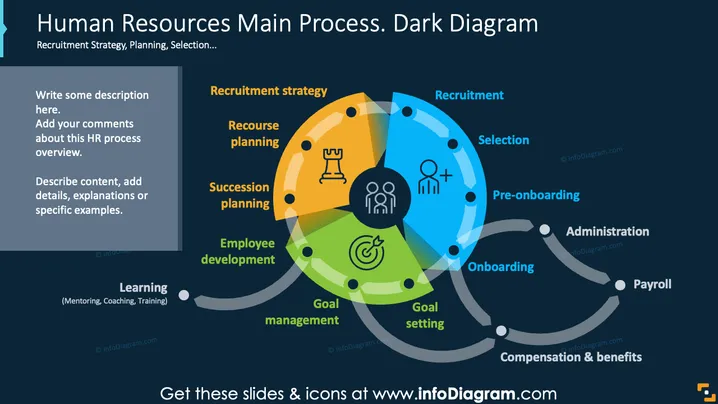
The slide illustrates various aspects of the HR process using a circular diagram. "Recruitment strategy" emphasizes planning to attract suitable candidates. "Recourse planning" involves preparing resources for effective recruitment. "Succession planning" focuses on identifying and developing future leaders. "Employee development" addresses skills enhancement. "Goal management" aligns employee activities with company objectives. "Goal setting" is about defining specific targets for individuals. Additional stages include "Recruitment," "Selection," "Pre-onboarding," "Onboarding," "Administration," "Payroll," and "Compensation & benefits," highlighting key HR processes from hiring to employee maintenance.
The slide integrates vibrant colors and clear icons to communicate HR processes effectively. The layout ensures clarity while guiding the viewer through each step of the human resource journey.




