
Your graphics add a nice touch to my presentations and I recently used them for one of my all-hands meetings. Your toolbox adds professionalism to my slides. Instead of using standard clipart.
Claude Jones, Director of Engineer, @Walmartlabs, USA

Your graphics add a nice touch to my presentations and I recently used them for one of my all-hands meetings. Your toolbox adds professionalism to my slides. Instead of using standard clipart.
Claude Jones, Director of Engineer, @Walmartlabs, USA

I needed a fresh look at some of my slides. I've tried to find a way to create a paintbrush effect, to underline, accentuate, add some color and the handwritten markers were just the things. Very easy to use, easy to size, change the color. It was an affordable, perfect solution and I'm happy to recommend it.
Anonymous, US
The crisp, clean look of the graphics, and the fact that it allowed me to easily edit and change the colors to match the template was my main reason for purchasing them.
Brandie Jenkins, E-learning Developer, USA
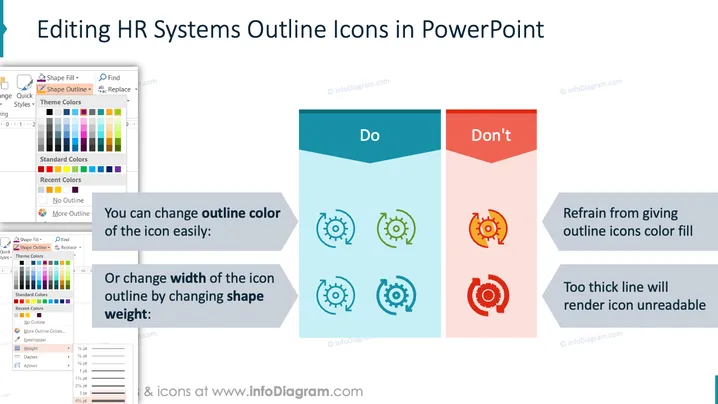
The slide demonstrates how to correctly edit HR system icons in PowerPoint by illustrating "Do's" and "Don'ts." The "Do" section suggests changing the outline color and adjusting the shape weight for enhanced clarity. Conversely, the "Don't" section cautions against adding color fills to the outlines and using excessively thick lines, as these make icons unreadable.
The slide uses a clear, instructional layout with distinct sections to emphasize best practices in icon editing. The use of colors and icons aids in understanding proper and improper techniques visually.


