
Your graphics add a nice touch to my presentations and I recently used them for one of my all-hands meetings. Your toolbox adds professionalism to my slides. Instead of using standard clipart.
Claude Jones, Director of Engineer, @Walmartlabs, USA

Your graphics add a nice touch to my presentations and I recently used them for one of my all-hands meetings. Your toolbox adds professionalism to my slides. Instead of using standard clipart.
Claude Jones, Director of Engineer, @Walmartlabs, USA
I needed a fresh look at some of my slides. I've tried to find a way to create a paintbrush effect, to underline, accentuate, add some color and the handwritten markers were just the things. Very easy to use, easy to size, change the color. It was an affordable, perfect solution and I'm happy to recommend it.
Anonymous, US
The crisp, clean look of the graphics, and the fact that it allowed me to easily edit and change the colors to match the template was my main reason for purchasing them.
Brandie Jenkins, E-learning Developer, USA
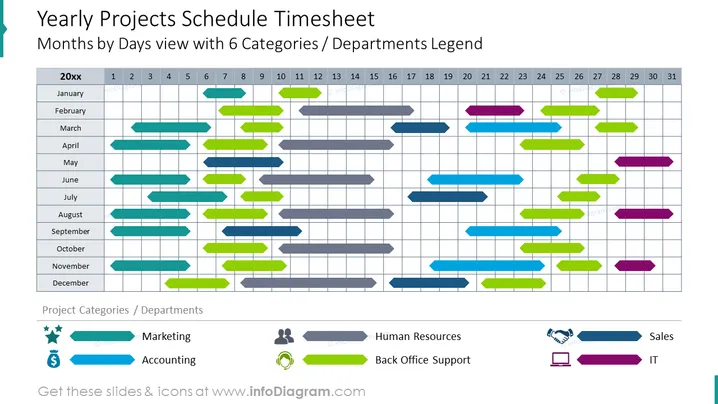
Utiliza este enriquecido diagrama de Gantt para presentar proyectos relacionados con 6 departamentos de tu empresa. Sé claro con tu mensaje gracias a la codificación por colores, iconos significativos que ilustran a cada propietario del proyecto, e indicadores editables del proyecto colocados contra el cronograma anual dividido en meses y días. Aprende más sobre el diagrama de Gantt en Wikipedia.
Este Diagrama de Cronograma Anual de Proyectos es parte de nuestros Gráficos de Diagrama de Gantt para la Plantilla de PPT de Planificación de Proyectos.