
Your graphics add a nice touch to my presentations and I recently used them for one of my all-hands meetings. Your toolbox adds professionalism to my slides. Instead of using standard clipart.
Claude Jones, Director of Engineer, @Walmartlabs, USA
Your graphics add a nice touch to my presentations and I recently used them for one of my all-hands meetings. Your toolbox adds professionalism to my slides. Instead of using standard clipart.
Claude Jones, Director of Engineer, @Walmartlabs, USA
I needed a fresh look at some of my slides. I've tried to find a way to create a paintbrush effect, to underline, accentuate, add some color and the handwritten markers were just the things. Very easy to use, easy to size, change the color. It was an affordable, perfect solution and I'm happy to recommend it.
Anonymous, US
The crisp, clean look of the graphics, and the fact that it allowed me to easily edit and change the colors to match the template was my main reason for purchasing them.
Brandie Jenkins, E-learning Developer, USA
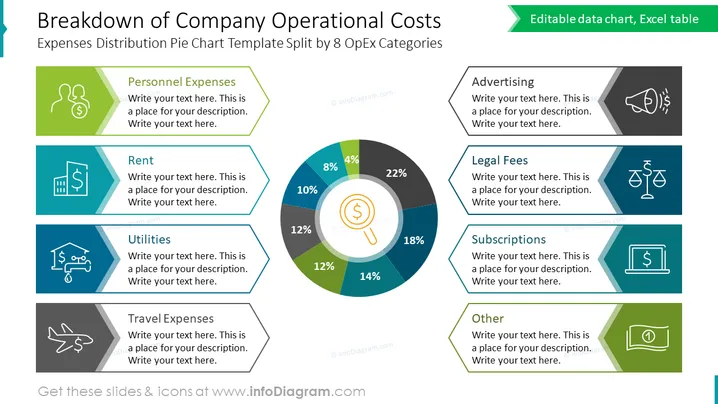
Esta diapositiva de PowerPoint presenta un desglose detallado de los costos operativos de la empresa, mostrando un gráfico circular central dividido en ocho categorías que significan varios gastos operativos. Cada categoría está etiquetada con un porcentaje y flanqueada por un espacio dedicado para una descripción adicional. Las categorías son: Gastos de Personal (22%), Alquiler (18%), Servicios Públicos (12%), Gastos de Viaje (14%), Publicidad (8%), Honorarios Legales (10%), Suscripciones (12%) y Otros (4%). Este diseño ayuda a proporcionar a la audiencia una clara representación visual de cómo se asignan los recursos dentro de una empresa.




