

Your graphics add a nice touch to my presentations and I recently used them for one of my all-hands meetings. Your toolbox adds professionalism to my slides. Instead of using standard clipart.
Claude Jones, Director of Engineer, @Walmartlabs, USA

Your graphics add a nice touch to my presentations and I recently used them for one of my all-hands meetings. Your toolbox adds professionalism to my slides. Instead of using standard clipart.
Claude Jones, Director of Engineer, @Walmartlabs, USA
I needed a fresh look at some of my slides. I've tried to find a way to create a paintbrush effect, to underline, accentuate, add some color and the handwritten markers were just the things. Very easy to use, easy to size, change the color. It was an affordable, perfect solution and I'm happy to recommend it.
Anonymous, US
The crisp, clean look of the graphics, and the fact that it allowed me to easily edit and change the colors to match the template was my main reason for purchasing them.
Brandie Jenkins, E-learning Developer, USA
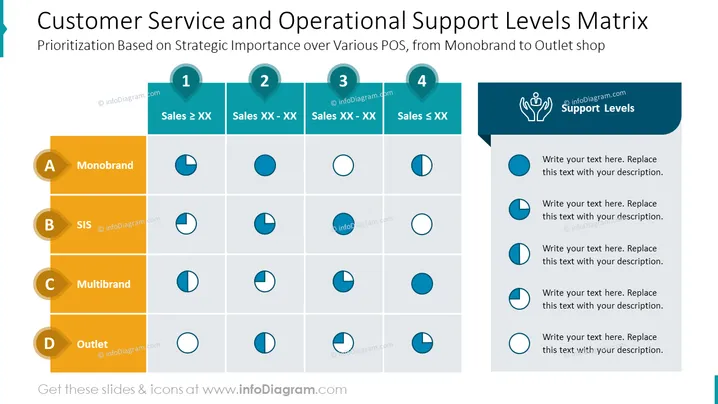
La diapositiva de PowerPoint titulada "Matriz de Niveles de Soporte Operacional y de Servicio al Cliente" presenta una matriz para priorizar el servicio al cliente y el soporte operacional basado en la importancia estratégica a través de diferentes puntos de venta, desde tiendas monobrand hasta outlets. El eje vertical, marcado de A a D, categoriza los tipos de puntos de venta: Monobrand, SIS, Multibrand y Outlet. El eje horizontal, numerado del 1 al 4, clasifica los niveles de ventas desde "Ventas > XX" hasta "Ventas < XX." La diapositiva parece comparar estos aspectos utilizando íconos circulares de varios niveles de llenado para denotar diferentes niveles de soporte (indicados por "Niveles de Soporte" y texto de marcador de posición para el significado de cada círculo).
La diapositiva es limpia y utiliza la codificación de colores y los íconos de manera efectiva, creando una jerarquía visual que facilita el seguimiento de la información. La elección de íconos circulares para representar diferentes niveles de soporte es intuitiva y permite una evaluación rápida de la matriz de un vistazo.



