
Your graphics add a nice touch to my presentations and I recently used them for one of my all-hands meetings. Your toolbox adds professionalism to my slides. Instead of using standard clipart.
Claude Jones, Director of Engineer, @Walmartlabs, USA
Your graphics add a nice touch to my presentations and I recently used them for one of my all-hands meetings. Your toolbox adds professionalism to my slides. Instead of using standard clipart.
Claude Jones, Director of Engineer, @Walmartlabs, USA
I needed a fresh look at some of my slides. I've tried to find a way to create a paintbrush effect, to underline, accentuate, add some color and the handwritten markers were just the things. Very easy to use, easy to size, change the color. It was an affordable, perfect solution and I'm happy to recommend it.
Anonymous, US
The crisp, clean look of the graphics, and the fact that it allowed me to easily edit and change the colors to match the template was my main reason for purchasing them.
Brandie Jenkins, E-learning Developer, USA
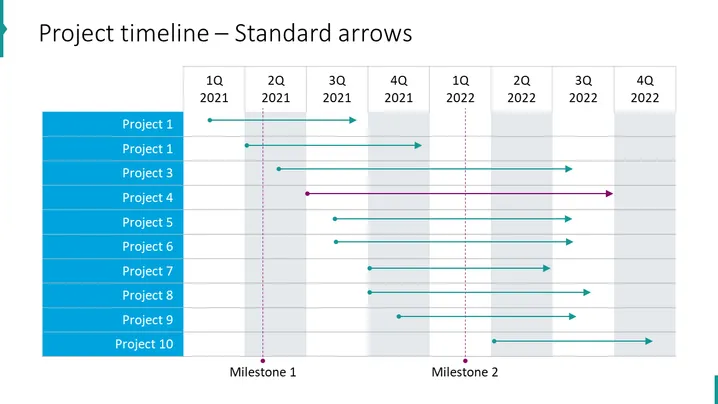
La diapositiva de PowerPoint se titula "Cronograma del Proyecto – Flechas Estándar" y describe los cronogramas de 10 proyectos diferentes durante un período de dos años, divididos en trimestres (T1-T4). Cada proyecto tiene una flecha horizontal correspondiente que abarca desde su inicio hasta su fecha de finalización proyectada o real, con algunas flechas que se extienden de un año a otro. Además, dos líneas verticales discontinuas etiquetadas como "Hito 1" y "Hito 2" representan puntos de control o eventos significativos dentro del cronograma.
La diapositiva tiene un diseño limpio y profesional, utilizando tonos de azul, verde azulado y gris para diferenciar entre proyectos y sus respectivos cronogramas. Hay una clara delimitación del tiempo y los proyectos, con marcadores visuales que indican hitos, lo que permite una rápida comprensión del flujo general del proyecto.




