
Your graphics add a nice touch to my presentations and I recently used them for one of my all-hands meetings. Your toolbox adds professionalism to my slides. Instead of using standard clipart.
Claude Jones, Director of Engineer, @Walmartlabs, USA

Your graphics add a nice touch to my presentations and I recently used them for one of my all-hands meetings. Your toolbox adds professionalism to my slides. Instead of using standard clipart.
Claude Jones, Director of Engineer, @Walmartlabs, USA
I needed a fresh look at some of my slides. I've tried to find a way to create a paintbrush effect, to underline, accentuate, add some color and the handwritten markers were just the things. Very easy to use, easy to size, change the color. It was an affordable, perfect solution and I'm happy to recommend it.
Anonymous, US
The crisp, clean look of the graphics, and the fact that it allowed me to easily edit and change the colors to match the template was my main reason for purchasing them.
Brandie Jenkins, E-learning Developer, USA
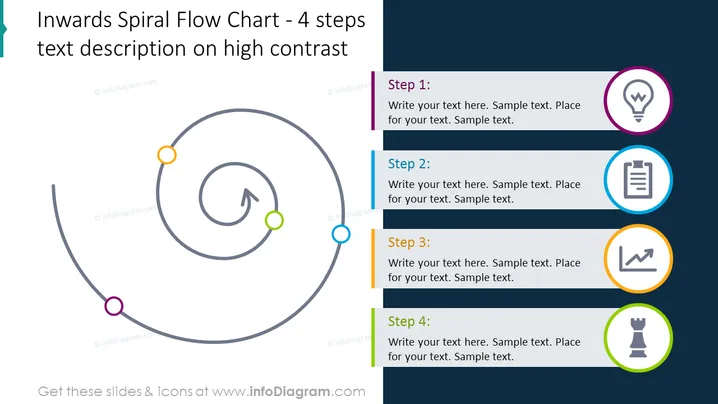
La diapositiva de PowerPoint presenta un proceso utilizando un "Diagrama de Flujo en Espiral Inversa - Descripción del Texto en 4 Pasos con Alto Contraste." Describe un proceso circular de cuatro pasos que espirala hacia el centro. Cada paso se indica con un círculo anotado de un color único y un ícono junto a él, implicando un proceso de progresión o desarrollo donde los detalles o la complejidad podrían aumentar a medida que uno avanza hacia el interior.
La apariencia general de la diapositiva es pulida y profesional, con una jerarquía visual limpia y clara que guía la vista del espectador a lo largo del proceso. Los colores de fondo contrastantes y el uso de íconos ayudan a distinguir diferentes secciones y a enfatizar el contenido.